Frequently Asked Questions
Are these password recovery tools free?
— Yes. All SterJo Software tools listed on this website are completely free to download and use. No subscription, registration, or hidden fees.
Is it legal to use password recovery tools?
— Yes, but ONLY for accounts, files, and systems you own or have explicit permission to access. Unauthorized recovery attempts on other people's data are illegal.
Do these tools work on Windows 7?
— Yes. All tools are updated to support Windows 7, 8, 10, and Windows 11 (both 32-bit and 64-bit versions). Almost all of them even support Windows XP.
Can these tools recover passwords from other users on the same PC?
— Most tools require access to the user’s own Windows account or browser profile. They cannot bypass system-level protections or decrypt profiles from other users.
Can these tools recover passwords after reinstalling Windows?
— Yes, if the old user profile or browser data still exists on the disk. If the profile was deleted, recovery is not possible.
Do the tools collect or upload any passwords?
— No. SterJo Software tools work fully offline and do not transmit any data outside your computer.
Can antivirus software flag password recovery tools?
— Sometimes antivirus programs may flag password recovery tools as “Potentially Unwanted Software” (PUP) because they can reveal passwords. All tools on this site are clean and virus-free.
I have used the products and don’t need them anymore. How do I uninstall them?
— All products include an installer with an uninstall option. If you used the portable versions, simply delete their files and folders from your computer. The products do not use the registry, so they won’t leave any traces behind.
Can we use the products in our company?
— Yes. You may use all of my products for personal or commercial purposes without any additional license.
Can we include the products on our CD-ROM or distribute them with our magazine?
— Yes. All products may be freely distributed with any magazine and may be included on a CD-ROM.
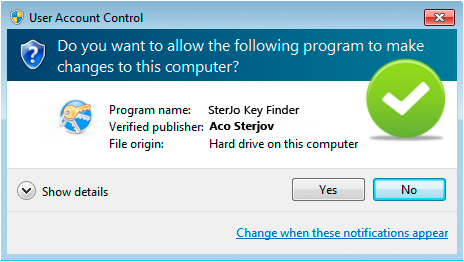
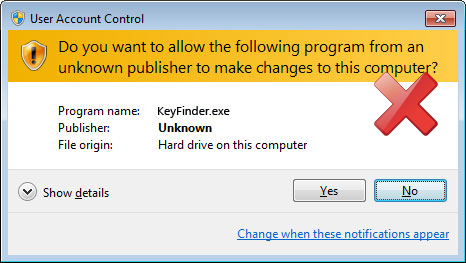
Why does it always say “Unknown Publisher” when I run your products?
Originally, my products did not have a digital certificate, which caused Windows to display “Unknown Publisher.” Obtaining such a certificate can cost several hundred dollars annually, and donations help cover the cost so that I can digitally sign all my products.
— All of my freeware has been digitally signed since March 2013. If you see “Unknown Publisher” after this date, it means the software has been modified by someone else and may contain malicious code such as a virus or Trojan. In this case, please do not run the executable file, especially if you downloaded it from an unknown website or a torrent.
Below is an example showing when you should or should not allow access.
I can't donate, but I really like your products. How can I contribute?
— Thank you for using my products. If you’d like to support my work in another way, please consider posting a few kind words on software-related forums or social networks. It would mean a lot to me.
The antivirus software on my computer reports that some of your products are infected with a virus or Trojan. Why?
— All products on my website are clean and do not contain any viruses or Trojans. If your antivirus software flags them as suspicious, this is a false alert. Please make sure you have downloaded my products from my official website or other trusted sources, and not from torrents or unknown websites.
There may be situations where the installer offers to download additional optional files (usually advertisements that help cover my expenses). These are not viruses and can be easily skipped by unchecking the option or clicking the "Decline" button when the ads appear. I included these optional offers in some of my software due to a lack of donations. To be honest, I have received only a few donations despite the software being downloaded several hundred thousand times.
I hope you can understand why I made this decision and continue to support the project; otherwise, I may have to stop developing it.
I get "run-time error" when I run some products. What should I do?
— Make sure you have administrative privileges on your computer and that you haven’t deleted any additional files from the installation folder. You can also try right-clicking the software and selecting "Run as administrator". If the problem persists, please download the product again from my website.
Can the products be translated into different languages?
— Yes. Some products support multiple languages. You can open the Language section and choose your desired language, or you can manually translate them into your own language by opening the "Translate.lng" file located in the Language folder.
How do I report a bug?
— You can report a bug by sending me an email with a clear description of the issue.