SterJo Mail Passwords – Recover Saved Email Passwords
SterJo Mail Passwords is a lightweight email password recovery tool designed to recover saved and forgotten email passwords from popular email clients and webmail services. It supports Microsoft Outlook (2003–2019), Mozilla Thunderbird, Eudora, PocoMail, Gmail, Yahoo, Hotmail, AOL, GMX, Zoho, Yandex, Mail.com, Lycos, ProtonMail, and HushMail. The software works with all major browsers including Chrome, Firefox, Internet Explorer, Microsoft Edge, Opera, Vivaldi, Yandex Browser, and Brave.
How Does SterJo Mail Passwords Work?
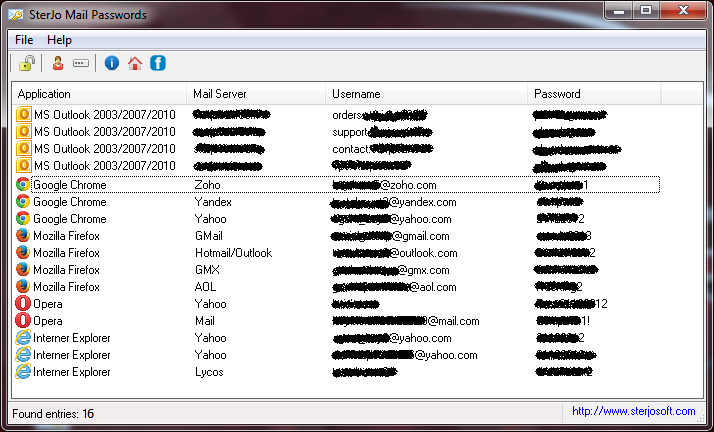
SterJo Mail Passwords scans supported web browsers and email clients for stored login credentials. If an email password was previously saved, the software decrypts and displays it instantly.
The recovered email accounts, usernames, and passwords are shown in a clear interface and can be copied to the clipboard for later use.
Related tools: Windows Credentials Recovery | Chrome Passwords Recovery
Step-by-Step: Recover Your Email Password
- Download SterJo Mail Passwords using the link above.
- Run the application — no installation needed for the portable version.
- The tool automatically scans all supported email clients and browser profiles.
- All found email credentials appear in the results table with email address and password.
- Copy the credentials you need with one click.
Download & Install
📥 Download SterJo Mail Passwords v1.6 (1.5 MB)
Download Installer Portable Version✓ Works on Windows 11, 10, 8, 7, Vista, XP (32/64-bit)
SterJo Mail Passwords works on both 32-bit and 64-bit editions of Windows XP, Windows Vista, Windows 7, Windows 8, Windows 10 and Windows 11 where previously passwords were saved by web browsers, MS Outlook or Mozilla Thunderbird.
Version History
Version 1.6: Eudora and PocoMail included.
Version 1.5: Mozilla Thunderbird client and Brave browser included.
Version 1.4: Small bug fixed.
Version 1.3: Added support for Microsoft Outlook 2003/2007/2010/2013/2016/2019.
Version 1.2: Vivaldi and Yandex browsers included.
Version 1.1: Added multi-language support.
Version 1.0: First public release.
Supported Email Clients
SterJo Mail Passwords recovers saved credentials from a wide range of sources:
- Microsoft Outlook — Versions 2003, 2007, 2010, 2013, 2016 and 2019. Outlook stores POP3, IMAP and Exchange account passwords in the Windows Credential Manager, which SterJo Mail Passwords reads and decrypts.
- Mozilla Thunderbird — Reads from the Thunderbird profile's stored logins database (logins.json). Note: 32-bit limitation applies for Thunderbird 64-bit builds.
- Eudora and PocoMail — Legacy email clients that stored account credentials in local configuration files.
- Web browsers — Chrome, Firefox (32-bit), Edge (Legacy and Chromium), Opera, Vivaldi, Brave, Yandex Browser and Internet Explorer. Webmail passwords (Gmail, Yahoo, Outlook.com, Hotmail, AOL, GMX, Zoho, Yandex, Mail.com, Lycos, ProtonMail, HushMail) saved by these browsers are all covered.
When You Need Email Password Recovery
Email passwords are among the most critical credentials to recover — your email account is often the gateway to resetting passwords for every other service you use. Common scenarios:
- Setting up email on a new device — You need your email server password to configure your account in Outlook or Thunderbird on a new PC, but you've relied on autofill for years.
- Configuring a second device — Adding your email account to a phone, tablet or second computer requires entering the actual password.
- Before changing your email password — Document your current password before a forced reset to ensure no interruption to connected services.
- Legacy email clients — Recovering an old Eudora or Outlook 2003 account password for an archived mailbox you need to access again.
- IT helpdesk recovery — Assisting users who have lost access to their saved email credentials on a managed Windows PC.
Frequently Asked Questions
What email passwords can SterJo Mail Passwords recover?
It can recover passwords for Gmail, Yahoo, Outlook, Hotmail, AOL and other supported email services if they were previously saved.
Can it recover passwords that were never saved?
No. The software can only recover email passwords that were stored by browsers or email clients.
Which browsers and email clients are supported?
Chrome, Firefox, Edge, Opera, Brave, Outlook, Thunderbird, and other supported clients.
Why is my Thunderbird or Firefox password blank?
Firefox and Thunderbird switched most users to 64-bit builds. SterJo's decryption modules are 32-bit, so passwords saved in 64-bit Firefox/Thunderbird may not be recoverable with this tool. See the note above for the opt-out guide.
Does it recover Microsoft Exchange passwords?
Outlook 2003 through 2019 with Exchange accounts is supported. The tool reads the Outlook password entries stored in Windows Credential Manager, which includes Exchange account credentials.
Is the tool safe to use?
Yes. SterJo Mail Passwords only reads locally stored credentials. No data is transmitted externally. The tool is read-only and does not modify any saved passwords or email settings.
Can I recover two-factor authentication email passwords?
The tool recovers the stored account password itself. Two-factor authentication is a separate verification step handled during login — it does not affect what is stored in the password database.
Does it work with Office 365 / Microsoft 365?
Microsoft 365 (formerly Office 365) accounts may store credentials differently depending on how the account was configured in Outlook. Modern authentication tokens may be used instead of plain passwords in some configurations.
Is the tool free?
Yes. SterJo Mail Passwords is completely free to download and use with no registration required.
Safe & Legal Use
This tool is intended for recovering your own saved credentials from your own device. Terms of Use | Privacy Policy
📋 Popular Password Guides
- Wi-Fi How to Find Any Saved Wi-Fi Password
- Product Keys Backup Keys Before Reinstalling Windows
- Security Detect Unauthorized Network Access
- Chrome Recover Saved Chrome Passwords
- Windows Windows Credential Manager Explained
