Fix Slow Computer & Monitor Windows Startup Programs
Is your PC taking forever to boot? Does it feel sluggish right after login? The culprit is almost always too many startup programs. Every time you install software, many programs sneakily add themselves to startup, consuming memory and CPU before you even open a browser.
SterJo Startup Patrol is a free utility that watches over your Windows startup in real time. Unlike static startup managers, it alerts you the moment any program tries to add itself to startup. You can then block it immediately – before it slows down your next boot.
⚠️ Warning: Some startup entries are needed by Windows or your antivirus. If unsure, research before disabling. Startup Patrol lets you temporarily block and restore easily.
Common Situations
- PC boots slowly – how to speed it up
- A program keeps adding itself to startup
- Suspicious software might be starting with Windows
- New PC feels slow – clean up bloatware startup
- Startup Patrol vs other methods
How SterJo Startup Patrol Works
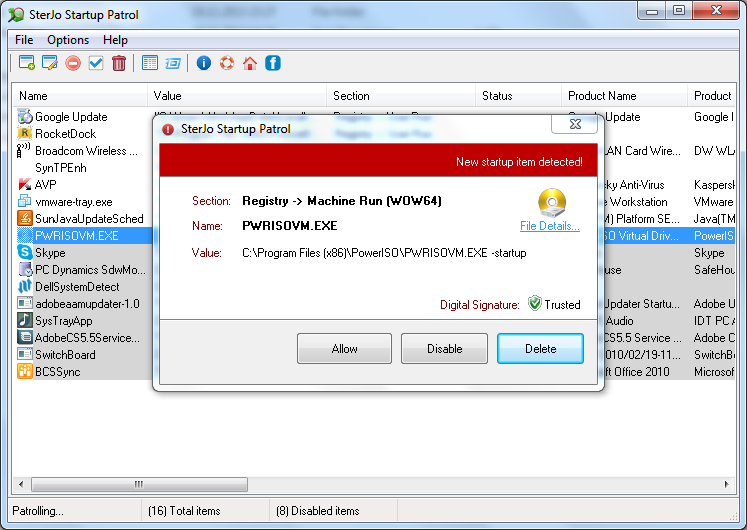
Startup Patrol runs in the system tray and quietly monitors all common startup locations. When any application attempts to add a new startup entry – during installation or by a running process – you get a pop-up alert.
The alert shows:
- The program name and full file path
- The startup location being modified (registry key, startup folder, etc.)
- Buttons to Allow, Disable or Delete the change.
You can also open the main window to see a complete list of currently active startup entries and disable them manually.
Key Features of Startup Patrol
- Real-time monitoring: Instant alerts when anything tries to add itself to startup.
- Comprehensive startup list: View all current startup entries from all locations.
- One-click disable/enable: Temporarily or permanently disable startup items.
- Digital signature check: Alerts show if the program is digitally signed (helps identify legitimate software).
- Right-click search: Quickly search Google for unknown entries.
- Portable: Run from USB – no installation needed.
- Low resource usage: Minimal CPU/RAM footprint.
Download & Install
📥 Download SterJo Startup Patrol v1.6 (2.2 MB)
Download Installer Portable Version✓ Works on Windows 11, 10, 8, 7, Vista, XP (32/64-bit)
Download the installer or portable version, extract if needed, and run StartupPatrol.exe. The portable version does not modify system files. For network monitoring, check SterJo NetStalker.
System Requirements
Windows XP, Vista, 7, 8, 10, and 11 (32-bit and 64-bit versions)
Version History
Version 1.6: Minor changes, alert sound for new entries
Version 1.5: Small bug fix
Version 1.4: Right-click Google search on suspicious files
Version 1.3: Checks if new entry is digitally signed
Version 1.2: Minor UI improvements
Version 1.1: Bug fixes
Version 1.0: First public release
Why Startup Bloat Happens
Every time you install software on Windows, many programs add themselves to startup automatically — often without telling you. The reasons vary: update checkers want to run first, background services want to be ready before you use the app, and some software aggressively re-adds itself to startup even after you disable it. Over months and years of software installation, this accumulates into dozens of background processes launching at boot, consuming RAM and extending startup time from seconds to minutes.
The challenge with standard startup management is that it only shows you what's already there — you have to periodically review the list and clean it up. SterJo Startup Patrol takes a different approach: it watches in real time and tells you the moment anything new is added, so you can intercept it before it becomes a permanent drain on your system.
SterJo Startup Patrol vs. Windows Built-In Methods
Task Manager Startup tab (Windows 8+) shows current startup entries and lets you disable them, but only shows entries that already exist. It cannot notify you when new entries are added and misses some less-common startup locations.
msconfig (System Configuration) shows startup entries but is not real-time and is primarily designed for troubleshooting, not ongoing management. It also requires manual launches.
SterJo Startup Patrol monitors all startup registry locations continuously in the background. The critical advantage is the real-time alert — you know about new startup entries the moment they're created, during software installation, so you can block them immediately rather than discovering them later.
Frequently Asked Questions
Why is my computer slow and how can Startup Patrol help?
Excessive Windows startup programs and unnecessary background applications can slow down your PC. SterJo Startup Patrol helps you block, disable, or manage startup items, improving boot speed and overall performance.
How do I make my PC faster?
By controlling startup programs, performing a clean boot Windows, and removing unnecessary entries in the startup folder Windows, you can make your PC run faster and more efficiently.
Which Windows startup items does SterJo Startup Patrol monitor?
It monitors all important startup locations including registry keys, startup folders, and Windows boot programs that automatically run when your computer starts.
Can SterJo Startup Patrol improve boot time on Windows 11?
Yes. By reducing unnecessary startup items and optimizing your startup menu Windows 11, your PC can achieve faster startup Windows 11.
Can this tool detect malware or unwanted software affecting startup?
Many malware and potentially unwanted programs add themselves to startup. SterJo Startup Patrol detects these changes early, helping protect your system from slowdowns and suspicious activity.
Does SterJo Startup Patrol block malware automatically?
While it is not an antivirus, it prevents suspicious software from launching automatically, adding an extra layer of protection to your startup programs.
Is SterJo Startup Patrol free to use?
Yes. The tool is 100% free with no hidden charges and works safely without modifying system files unless you approve changes.
Is Startup Patrol safe for my PC?
Absolutely. It only monitors and manages startup entries. Changes are applied only when you allow them, making it safe for home and work PCs.
Can I disable startup programs using SterJo Startup Patrol?
Yes. You can easily enable, disable, or remove startup programs, controlling which applications run when Windows starts.
Can I restore blocked startup changes?
Yes. You can reverse previous decisions or adjust permissions from the program interface anytime.
How does SterJo Startup Patrol differ from MSConfig or Task Manager?
Unlike MSConfig or Windows Task Manager, Startup Patrol continuously monitors startup changes and provides real-time alerts, not just manual startup management.
Is SterJo Startup Patrol portable?
Yes. The portable version runs without installation, allowing you to manage startup programs directly from a USB drive.
Who should use SterJo Startup Patrol?
Ideal for home users, IT technicians, and advanced users who want better control over Windows startup behavior, fix slow boot issues, and optimize system performance.
Does SterJo Startup Patrol support older Windows versions?
Yes. It works on Windows XP, Vista, 7, 8, 10, and 11 (both 32-bit and 64-bit).
How is Startup Patrol different from Task Manager's Startup tab?
Task Manager shows existing entries but does not alert you in real time when new ones are added. Startup Patrol monitors continuously and pops up an alert the moment any program tries to add itself to startup — during installation or any time.
Can Startup Patrol catch malware that adds itself to startup?
Yes. Real-time monitoring means any attempt to add a startup entry — including by malicious software — triggers an immediate alert. This gives you the opportunity to investigate and block it before the next reboot.
Will disabling startup entries break anything?
Disabling a startup entry just prevents the program from launching at boot. The program itself still works normally when you open it manually. You can re-enable any entry you accidentally disabled.
Can I use Startup Patrol alongside SterJo Task Manager?
Yes. SterJo Task Manager gives you a complete view of all running processes, services and network connections. Startup Patrol focuses specifically on monitoring startup locations in real time. They complement each other well for full system control.
Does Startup Patrol monitor Scheduled Tasks?
The core monitoring focuses on registry startup keys and startup folders. Scheduled Tasks are a separate mechanism — check Windows Task Scheduler for those entries.
📋 Popular Password Guides
- Wi-Fi How to Find Any Saved Wi-Fi Password
- Product Keys Backup Keys Before Reinstalling Windows
- Security Detect Unauthorized Network Access
- Chrome Recover Saved Chrome Passwords
- Windows Windows Credential Manager Explained
