SterJo Chrome Passwords – Free Chrome Password Recovery for Windows
SterJo Chrome Passwords is a free, portable Windows utility that instantly reveals all usernames and passwords saved by Google Chrome. It decrypts your locally stored Chrome credentials and displays them in a clean, searchable table — along with the website URL, usage count and creation timestamp. You can export the results to HTML or a KeePass-compatible CSV file for backup or migration to a password manager.
Everything runs 100% offline. No data is uploaded or transmitted anywhere. SterJo Chrome Passwords only reads the Chrome profile belonging to the currently logged-in Windows user.
How SterJo Chrome Passwords Works
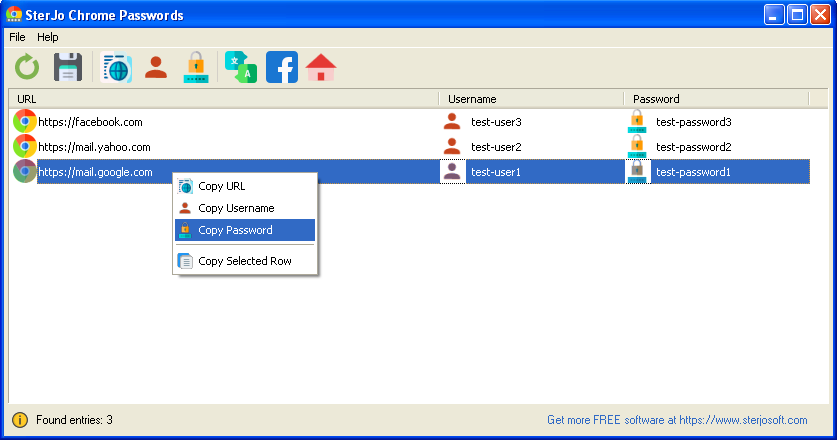
When you ask Chrome to remember a login, the browser encrypts and stores it inside your Windows user profile (in %LocalAppData%\Google\Chrome\User Data\Default\Login Data). SterJo Chrome Passwords locates that file, decrypts the credentials using the same Windows DPAPI key that Chrome uses, and presents everything in a readable table. The process takes only a few seconds regardless of how many saved logins you have.
Step-by-Step: How to Recover Saved Chrome Passwords
- Download SterJo Chrome Passwords below (installer or portable version).
- Run the program — no configuration needed.
- Wait a moment while it scans your Chrome profile.
- Browse the list of recovered usernames, passwords and URLs.
- Export to HTML or CSV if you want to back up or migrate your passwords.
Key Features
- Reveals all usernames and passwords saved by Google Chrome
- Shows the associated website URL and visit timestamps
- One-click copy of any credential to clipboard
- Export to HTML or KeePass-compatible CSV format
- Completely offline — no internet connection required
- Lightweight and portable — runs from a USB drive
- Compatible with Windows XP through Windows 11 (32 & 64-bit)
Download SterJo Chrome Passwords
📥 SterJo Chrome Passwords v2.1 (2.2 MB)
Download Installer Portable Version✓ Free forever | ✓ Windows XP – 11 (32/64-bit) | ✓ No account required
Version History
Version 2.1: Removed additional .DLL dependencies for better portability.
Version 2.0: UI improvements and removed .OCX dependencies.
Version 1.5: Updated to handle Chrome v80+ encryption changes.
Version 1.4: Fixed overflow bug on some systems.
Version 1.3: Added export to HTML and KeePass-compatible CSV; added creation timestamps.
Version 1.2: Bug fixes.
Version 1.1: Multi-language support.
Version 1.0: First public release.
When Would You Use This Tool?
The most common use cases for SterJo Chrome Passwords include:
- Switching computers — Moving to a new PC and need your saved logins before you close the old one.
- Migrating to a password manager — Exporting your Chrome logins to KeePass, Bitwarden or 1Password.
- Forgotten password — You know Chrome has the password saved somewhere but can't find it in the browser settings.
- Reinstalling Windows — Backing up all credentials before a clean Windows install.
- IT support — Helping a user recover access to an account on their own device.
Chrome Passwords vs Google Password Manager
Google's built-in password manager lets you view passwords you've saved in Chrome when signed into your Google account. However, you need internet access and a Google account login to use it. SterJo Chrome Passwords works entirely offline — useful when you need credentials but can't access Google's password manager, or when you need to export them for use outside Chrome.
Related browser password tools: Firefox Password Recovery | Edge Password Recovery | Opera Password Recovery | Internet Explorer Password Recovery
Frequently Asked Questions
Can SterJo Chrome Passwords reveal all my saved Chrome logins?
Yes. The tool decrypts and displays every username and password currently stored in the Chrome profile of the logged-in Windows user — including logins for websites.
Does the program upload my passwords anywhere?
No. SterJo Chrome Passwords operates entirely offline. It reads your local Chrome profile, decrypts it on your PC, and never transmits any data to external servers.
Can I export the recovered passwords?
Yes. You can export all recovered credentials to an HTML file for easy reading, or to a KeePass-compatible CSV file for importing into most password managers.
What if I deleted my Chrome profile?
If the Chrome profile containing saved credentials was deleted or overwritten, those passwords cannot be recovered unless you have a backup of the profile folder.
Can I recover passwords from another Chrome profile?
Chrome supports multiple profiles. The tool may detect multiple profiles depending on the version. Passwords from each profile require that profile's DPAPI decryption — all must be on the same Windows user account.
Does it work with Chrome on Windows 11?
Yes. Chrome's password storage format is consistent across Windows 10 and Windows 11. The tool supports both.
Can I recover Chrome passwords from a different Windows user account?
No. Chrome passwords are encrypted with the DPAPI key of the specific Windows user account. You must run the tool under the same account whose Chrome saved the passwords.
Does it recover passwords for Chromium-based browsers too?
The dedicated Chrome tool targets Chrome's specific profile path. For other Chromium-based browsers, use the appropriate dedicated tool: SterJo Edge Passwords, SterJo Opera Passwords, or SterJo Browser Passwords for all browsers at once.
Does Chrome have a master password?
Chrome does not support a master password. Password encryption is handled by Windows DPAPI, tied to your Windows login. This is why the tool must run as the correct Windows user to decrypt Chrome passwords.
Is the tool safe to use?
Yes. It reads the local Chrome profile files only. No data is transmitted externally.
Is this a hacking tool?
No. The tool only decrypts credentials already stored locally by your own browser, under your own Windows user account. It cannot access other users' profiles or remote systems. Use it only on accounts and devices you own or are authorized to manage.
Safe & Legal Use
SterJo Chrome Passwords is intended for recovering passwords on devices and accounts you own or are authorized to manage. Terms of Use | Privacy Policy
