SterJo Internet Explorer Passwords – Free IE Password Recovery for Windows
SterJo Internet Explorer Passwords is a free Windows utility that recovers all usernames and passwords saved by Internet Explorer. It also retrieves HTTP authentication credentials and form-based logins stored by IE in the Windows credential vault.
The tool works entirely offline. No data is transmitted outside your computer.
How SterJo IE Passwords Works
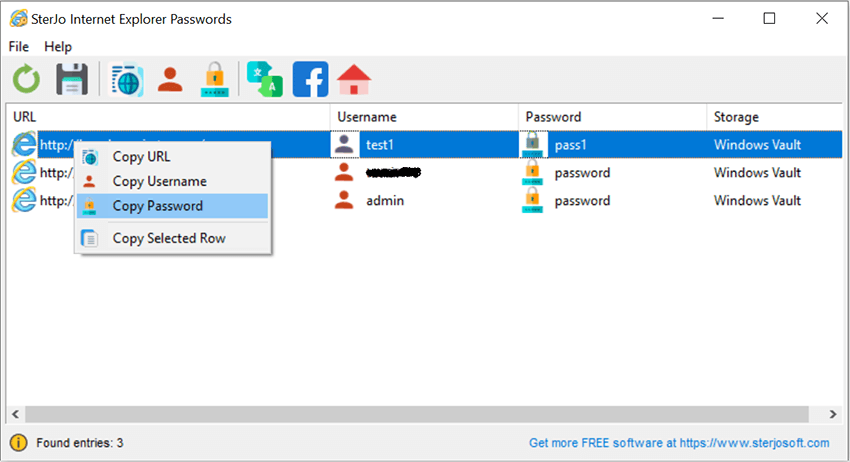
Internet Explorer stored saved passwords in the Windows Protected Storage (PStore) and later in the Windows Credential Manager vault. SterJo IE Passwords reads and decrypts both storage locations, presenting all found credentials in a simple table with website URL, username and password — ready to copy or export.
Step-by-Step: Recover IE Saved Passwords
- Download SterJo IE Passwords using the link below.
- Run the application — no installation needed for portable version.
- View the complete list of recovered IE credentials.
- Copy individual passwords to clipboard with one click.
- Export all results to TXT, HTML or CSV if needed.
Key Features
- Recovers all usernames and passwords saved by Internet Explorer
- Retrieves HTTP authentication credentials stored by Windows
- Displays website URL, username and password for each entry
- One-click clipboard copy for quick access
- Export to TXT, HTML or CSV format
- 100% offline — no data leaves your computer
- Portable — no installation required
- Compatible with Windows XP through Windows 11
Download SterJo IE Passwords
📥 SterJo IE Passwords v2.0 (1.8 MB)
Download Installer Portable Version✓ Free forever | ✓ Windows XP – 11 (32/64-bit) | ✓ No account required
Version History
Version 2.0: UI changes and removed .OCX dependencies.
Version 1.3: Added export to HTML (.html) and KeePass file (.csv).
Version 1.2: Minor bug fixed.
Version 1.1: Added multi-language support.
Version 1.0: First public release.
When Would You Need IE Password Recovery?
- Legacy enterprise systems — Many corporate intranets and internal tools still require IE or store credentials in the IE vault.
- Windows credential migration — Moving to a new computer and need to retrieve old IE-stored logins.
- Before decommissioning old hardware — Extracting all saved credentials from an old Windows PC before disposal.
- Accessing a legacy web portal — A saved IE password for an intranet site or router admin panel you haven't used in years.
Migrating IE Credentials to Modern Browsers
Once you've recovered your IE-stored passwords, you'll want to move them somewhere more useful:
- Use SterJo IE Passwords to export your recovered credentials to TXT, HTML or CSV format.
- Open your preferred modern browser (Edge, Chrome, Firefox) and go to its password manager settings.
- Most browsers support importing passwords from a CSV file. Chrome and Edge both support direct CSV import under their password settings.
- Map the columns from the SterJo export (URL, username, password) to the browser's import format.
- Consider using a dedicated password manager (Bitwarden, 1Password, KeePass) as a permanent solution.
Frequently Asked Questions
Does SterJo IE Passwords work on Windows 10 and 11?
Yes. Although Internet Explorer is no longer the default browser, Windows 10 and 11 still maintain the credential stores that IE used. The tool can retrieve those stored credentials on any supported Windows version.
Can it recover passwords from the Windows Credential Manager?
SterJo IE Passwords targets the Protected Storage and HTTP authentication credentials associated with Internet Explorer. For Windows Credential Manager entries (network passwords, Remote Desktop), see our SterJo Windows Credentials tool.
Can I export recovered IE passwords?
Yes. Export to TXT, HTML or CSV formats is supported for backup or migration purposes.
Does the tool send any data externally?
No. SterJo IE Passwords operates 100% offline and never transmits any recovered data.
Will this recover passwords from IE Mode in Microsoft Edge?
It recovers credentials stored by Internet Explorer in the Protected Storage and Credential Manager. Whether those credentials are also used by Edge's IE Mode depends on how the specific site handles authentication.
What if IE shows no saved passwords?
If the tool finds nothing, the IE credential stores on your system may be empty (no passwords were ever saved through IE) or the relevant credentials may have been deleted. Also check SterJo Windows Credentials and SterJo Windows Vault as some IE-related entries may be stored under those locations.
Is Internet Explorer completely gone from Windows 11?
The Internet Explorer browser application is removed, but the underlying components (MSHTML, Trident engine) still exist in Windows 11 to support IE Mode in Edge. The credential stores that IE populated can still be accessed by tools that know where to look.
Does running as administrator matter?
For best results, run SterJo IE Passwords as the same Windows user account that was used with Internet Explorer. Some Protected Storage locations require the correct user context to decrypt.
Safe & Legal Use
This tool is intended for recovering credentials on devices and accounts you own or are authorized to manage. Terms of Use | Privacy Policy
📋 Popular Password Guides
- Wi-Fi How to Find Any Saved Wi-Fi Password
- Product Keys Backup Keys Before Reinstalling Windows
- Security Detect Unauthorized Network Access
- Chrome Recover Saved Chrome Passwords
- Windows Windows Credential Manager Explained
