Task Manager and Process Explorer Software for Windows
This free Task Manager and Process Explorer for Windows helps you analyze running processes, manage startup programs, and fix a slow computer. If your PC is running slow, this task manager software shows exactly what is using your CPU, RAM, and disk so you can optimize performance.
SterJo Task Manager is a fast, lightweight, and completely FREE utility designed to help you manage running processes, startup programs, services, and network connections with ease. It’s an excellent replacement for the standard Windows task manager—especially if your PC has become slow or unresponsive.
If you need a tool that monitors network activity, check out SterJo NetStalker.
Task Manager Software for Windows Performance Analysis
If your computer is slow, freezing, or taking too long to start, the default Windows Task Manager often isn’t enough. SterJo Task Manager provides deeper insights and more control, allowing you to eliminate resource-heavy programs, manage services, and boost overall performance.
Process Explorer: Advanced Process Viewer for Windows
This easy-to-use task management tool displays everything happening inside your system: running processes, startup registry items, services, and active network connections.
When too many programs run at the same time—especially during important work—your computer slows down.
Fix a Slow Computer by Managing Startup Programs
- Task Manager for Windows with real-time system monitoring
- Advanced Process Explorer for viewing running processes
- Process viewer showing CPU, RAM, disk and network usage
- Manage Windows startup programs and boot programs
- Speed up a slow computer by disabling unnecessary processes
- Optimize faster startup on Windows 11
- Detect services such as Windows Installation Services activity
This smart utility helps your computer run smoother, faster, and without the usual interruptions.
Terminate Unwanted Processes
With SterJo Task Manager, you can instantly stop applications or background processes that are affecting your PC’s performance. Simply pick what you want to terminate or pause and restore system speed within seconds.
Because the tool is powerful enough to stop even important system tasks, it’s recommended to use careful judgment. Still, the interface is intuitive and beginner-friendly, so you always know what you're doing.
⚠️ Warning: Terminating critical system processes can cause instability. Only end processes you recognize as unnecessary (like resource-heavy applications you don't need).
You can also explore other free system tools such as SterJo Startup Patrol.
How SterJo Task Manager Works
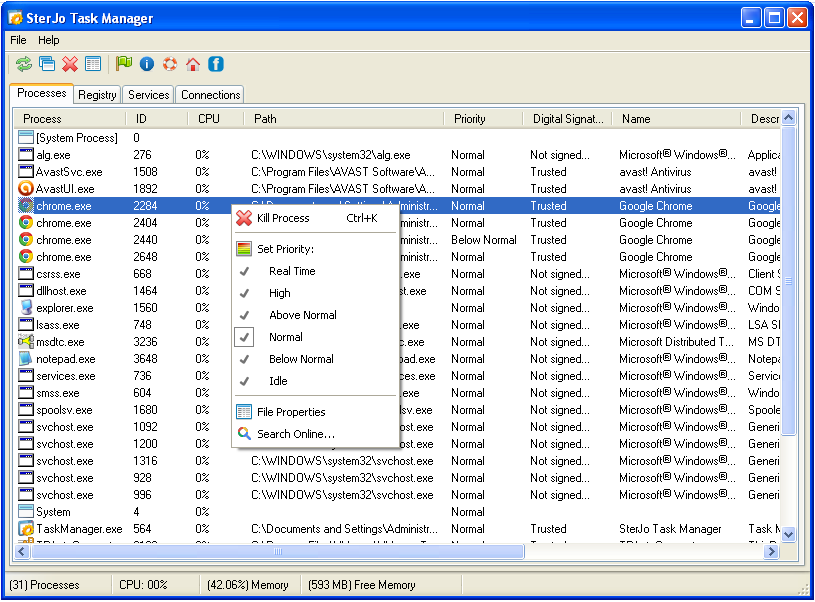
Key Features
- Full Process Control – View, prioritize, pause, or terminate any running process.
- Startup Manager – Disable unnecessary boot programs and improve startup time.
- Service Management – Pause, resume, or delete Windows services effortlessly.
- Network Connection Viewer – Monitor all active connections and detect suspicious activity.
- Lightweight & Fast – Uses minimal system resources and works instantly.
- Portable Version Available – No installation required; run it from a USB drive.
- Free and Easy to Use – No ads, no bundled software, completely free.
Download & Install
📥 Download SterJo Task Manager v2.9 (2.3 MB)
Download Installer Portable Version✓ Works on Windows 11, 10, 8, 7, Vista, XP (32/64-bit)
Available in both Installer and Portable versions. Download it now and get more control over your system—for free.
System Requirements
SterJo Task Manager is fully compatible with Windows XP, Vista, 7, 8, 10 and Windows 11 (both 32-bit and 64-bit versions)
Version history
Version 2.9: Minor UI improvements and bug fixes.
Version 2.1 - 2.8: Bug fixes.
Version 2.0: Major update.
Version 1.0: First public release.
Understanding Processes: What to Keep and What to Terminate
As a general guide when reviewing the process list:
System processes to leave alone: System, System Idle Process, smss.exe, csrss.exe, wininit.exe, services.exe, lsass.exe, explorer.exe, svchost.exe. Terminating these will cause Windows to crash or become unstable.
Safe to terminate if not needed: Browser processes (chrome.exe, firefox.exe) if you have too many tabs open consuming RAM. Background updater processes (adobeupdateservice.exe, etc.). Media players or programs you're not actively using.
If unsure: Right-click and search Google for the process name before terminating. SterJo Task Manager makes this easy with its built-in search option.
Frequently Asked Questions
What is a task manager and process explorer?
A task manager and process explorer is software that shows all running processes, services, startup programs, and system activity in Windows. SterJo Task Manager works as both a task manager and a process explorer, giving you complete control over your PC.
Is this a Microsoft Process Explorer alternative?
Yes. SterJo Task Manager works as a lightweight alternative to Microsoft Process Explorer. It provides advanced process viewing, startup management, service control, and network monitoring in a simpler interface.
My PC is running slow. Can a task manager help?
Yes. If your PC is running slow, a task manager helps you find which programs are using too much CPU, memory, or disk. SterJo Task Manager lets you stop unnecessary processes and speed up your computer.
How can I find what is slowing down my computer?
You can sort running processes by CPU, RAM, or disk usage and instantly see which applications are causing slowdowns. This makes it easy to fix performance problems.
Can I manage Windows startup programs with this task manager?
Yes. SterJo Task Manager lets you view, enable, or disable Windows startup programs and Windows boot programs to reduce startup time and improve performance.
How do I get faster startup on Windows 11?
To get faster startup on Windows 11, disable unnecessary startup programs using a task manager. SterJo Task Manager shows all boot programs so you can optimize your system easily.
Can this process explorer show all running processes in Windows?
Yes. This process explorer software shows all running processes, including system and background processes, giving you full visibility into your system.
Is SterJo Task Manager safe to use?
Yes. It only reads information already stored in Windows. It does not modify system files, crack software, or install unwanted components.
Can I end or kill processes using this task manager software?
Yes. You can safely terminate running processes, similar to Windows Task Manager, but with more detailed process information.
Does this task manager help with Windows startup and boot programs?
Yes. It shows both Windows startup programs and Windows boot programs so you can control what runs when your computer starts.
Do I need to install the software?
No. SterJo Task Manager also offers a portable version that runs without installation.
How is SterJo Task Manager different from Windows Task Manager?
SterJo Task Manager adds service management, integrated startup management, and active network connection viewing in a single, portable interface. It also shows process command lines and is fully portable.
Can I use it to terminate Windows system processes?
Technically yes, but terminating critical Windows processes will cause instability or a crash. Only terminate processes you recognize as unnecessary applications or background services you don't need running.
Can it help identify malware?
Yes. Unfamiliar processes with no digital signature, unusual file paths, or making unexpected network connections are worth investigating. The built-in Google search option lets you look up any process name instantly.
Does it monitor network connections in real time?
Yes. The network connections view shows all active TCP and UDP connections with the associated process name, local and remote address, and connection state. For dedicated network monitoring, also see SterJo NetStalker.
Is SterJo Task Manager portable?
Yes. A portable version is available that runs from a USB drive without installation, making it useful for IT technicians who need to diagnose multiple machines.
Is it free?
Yes. SterJo Task Manager is completely free to download and use.
📋 Popular Password Guides
- Wi-Fi How to Find Any Saved Wi-Fi Password
- Product Keys Backup Keys Before Reinstalling Windows
- Security Detect Unauthorized Network Access
- Chrome Recover Saved Chrome Passwords
- Windows Windows Credential Manager Explained
