SterJo Windows Credentials – Recover Windows Credential Manager Passwords Free
SterJo Windows Credentials is a free, portable Windows utility that scans the Windows Credential Manager and retrieves all previously saved passwords. This includes network authentication credentials, Remote Desktop (RDP) logins, shared folder passwords, VPN credentials and other entries saved by Windows for network-level authentication.
All decryption happens locally. The tool is 100% offline and never transmits any data externally.
How SterJo Windows Credentials Works
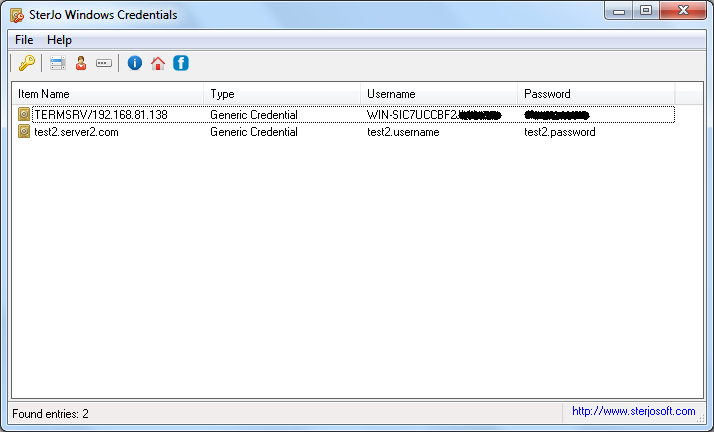
Windows Credential Manager is a built-in vault that stores authentication details for network shares, Remote Desktop sessions, websites accessed through Internet Explorer or Edge, and any application that uses the Windows credential store. SterJo Windows Credentials reads this vault, decrypts the stored entries using the Windows DPAPI, and displays all credentials in an instant — organized by resource name, username and password.
Step-by-Step: Recover Windows Credential Manager Passwords
- Download SterJo Windows Credentials below (installer or portable).
- Run the application as the user whose credentials you need to recover.
- View the full list of recovered network credentials.
- Click any entry to copy the username or password to clipboard.
- Note down or export the credentials you need before reinstalling or switching computers.
Key Features
- Recovers all passwords stored in Windows Credential Manager
- Retrieves Remote Desktop (RDP) login credentials
- Shows network share passwords and VPN credentials
- Displays entries saved by Internet Explorer and legacy Edge
- One-click copy of credentials to clipboard
- Lightweight and portable — no installation required
- 100% offline — nothing leaves your computer
- Compatible with Windows XP through Windows 11 (32 & 64-bit)
Download SterJo Windows Credentials
📥 SterJo Windows Credentials v1.2 (2.3 MB)
Download Installer Portable Version✓ Free forever | ✓ Windows XP – 11 (32/64-bit) | ✓ No account required
Version History
Version 1.2: Improved support for Windows 10 and 11 credential formats.
Version 1.1: Added VPN and RDP credential detection.
Version 1.0: First public release.
Who Uses This Tool?
SterJo Windows Credentials is commonly used by:
- IT administrators — Recovering saved RDP passwords for server access before account changes.
- Home users — Retrieving shared folder passwords on a home network when the password hasn't been entered manually in years.
- System migrators — Documenting all saved network credentials before migrating to a new PC.
- Remote workers — Recovering VPN or Remote Desktop credentials saved by Windows before a system rebuild.
Also see: Windows Credential Manager Complete Guide | Wi-Fi Password Recovery | Product Key Recovery
Common Stored Credentials You'll Find
After running SterJo Windows Credentials, you'll typically see entries for resources like:
- Network shares:
\SERVERShareNamewith the stored username and password - Remote Desktop connections:
TERMSRV/server-nameentries - Microsoft services: OneDrive, Office 365, Microsoft Account
- SharePoint and Teams: Corporate collaboration credentials
- VPN clients: Some VPN applications store credentials here
- Email clients: Outlook and Windows Mail store account credentials here
Windows Credentials vs Windows Vault: What's the Difference?
Both tools access parts of the Windows Credential Manager, but they focus on different sections:
SterJo Windows Credentials (this tool) focuses on network passwords, Remote Desktop credentials, and Generic Credentials used by Windows applications — the most commonly needed section for network and application access recovery.
SterJo Windows Vault Passwords focuses on Web Credentials — usernames and passwords saved by Internet Explorer and Legacy Edge for websites. If you need to recover old website login details saved through Microsoft's browsers, use that tool.
When in doubt, try both — they cover different parts of the same Credential Manager.
Frequently Asked Questions
What types of credentials can SterJo Windows Credentials recover?
The tool recovers network authentication credentials, Remote Desktop (RDP) passwords, shared folder access credentials, VPN logins, and entries saved by Internet Explorer or legacy Edge through the Windows Credential Manager vault.
Can it recover browser passwords saved by Chrome or Firefox?
No. Chrome, Firefox and Edge store their passwords in separate, browser-specific databases. For those, use our dedicated tools: Chrome Passwords, Firefox Passwords, or Edge Passwords.
Does the tool work on Windows 11?
Yes. SterJo Windows Credentials is fully compatible with Windows 11, Windows 10, Windows 8, Windows 7, Vista and XP on both 32-bit and 64-bit systems.
Can I recover credentials from another Windows user account on the same PC?
No. The Windows DPAPI encryption ties credentials to the specific Windows user profile that saved them. You must run the tool under the same user account whose credentials you want to recover.
Is SterJo Windows Credentials free?
Yes. The tool is completely free for personal and professional use with no registration or payment required.
Does it recover Remote Desktop passwords?
Yes. Remote Desktop credentials stored in Windows Credential Manager appear as TERMSRV/server entries and are fully recoverable with this tool.
Can it recover mapped network drive passwords?
Yes. Mapped drive credentials stored in Windows Credential Manager are recovered and displayed with the network path, username and password.
Does it recover Microsoft account passwords?
Microsoft account entries may appear in the results. However, Microsoft accounts are managed through Microsoft's authentication servers, so the locally stored token or credential may be a cached entry rather than the actual account password.
Is the tool safe to use?
Yes. SterJo Windows Credentials reads the Windows Credential Manager locally. No data is transmitted externally. The tool must run under the correct Windows user account to access that user's credentials.
What if no credentials are found?
The Credential Manager may simply be empty for this user — no network shares, Remote Desktop sessions or application credentials were ever saved. Also check SterJo Windows Vault for web credentials saved by Internet Explorer.
Safe & Legal Use
This tool is intended for recovering credentials on devices and accounts you own or are authorized to manage. Terms of Use | Privacy Policy
📋 Popular Password Guides
- Wi-Fi How to Find Any Saved Wi-Fi Password
- Product Keys Backup Keys Before Reinstalling Windows
- Security Detect Unauthorized Network Access
- Chrome Recover Saved Chrome Passwords
- Windows Windows Credential Manager Explained
