SterJo Firefox Passwords – Free Firefox Password Recovery for Windows
SterJo Firefox Passwords is a free, portable Windows utility that instantly reveals all usernames and passwords saved by Mozilla Firefox. It reads your local Firefox profile, decrypts stored credentials, and displays them in a clean table with the associated website URL and usage information. Results can be exported to TXT, HTML or CSV for backup or migration to a password manager.
The entire process is 100% offline. No passwords leave your computer. The tool only reads the Firefox profile of the currently logged-in Windows user.
How SterJo Firefox Passwords Works
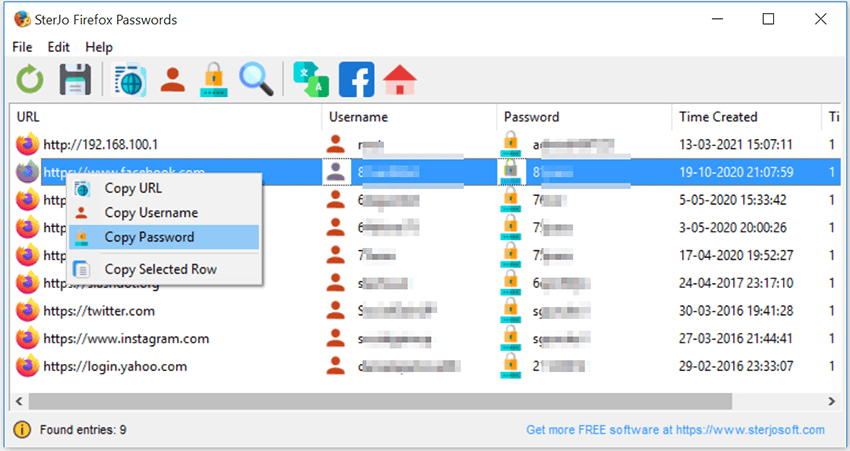
Mozilla Firefox encrypts and stores saved logins in a file called logins.json inside your Firefox profile folder. The decryption key is stored in the key4.db database in the same directory. SterJo Firefox Passwords reads both files, decrypts the credentials locally using your profile's master key, and presents everything in a searchable table in seconds.
Step-by-Step: Recover Saved Firefox Passwords
- Download SterJo Firefox Passwords (installer or portable version).
- Run the application — it auto-detects your Firefox profile location.
- View the full list of recovered usernames, passwords and URLs.
- Search or filter the results to find a specific login quickly.
- Export to TXT, HTML or CSV for backup or import into a password manager.
Key Features
- Reveals all usernames and passwords saved by Mozilla Firefox
- Displays the associated website URL for each credential
- Searchable and sortable results table
- Export to TXT, HTML or CSV (compatible with KeePass, Bitwarden and others)
- Supports Firefox 32 and all newer versions
- Works even if Firefox is currently closed or not responding
- 100% offline — no internet connection needed
- Portable version available — runs directly from USB
- Compatible with Windows XP through Windows 11 (32 & 64-bit)
Download SterJo Firefox Passwords
📥 SterJo Firefox Passwords v2.0 (2.1 MB)
Download Installer Portable Version✓ Free forever | ✓ Windows XP – 11 (32/64-bit) | ✓ No account required
Version History
Version 2.0: UI improvements and removed legacy dependencies.
Version 1.5: Added support for Firefox 57+ (Quantum) profile format.
Version 1.3: Added export to HTML and KeePass-compatible CSV.
Version 1.2: Bug fixes and stability improvements.
Version 1.1: Multi-language support added.
Version 1.0: First public release.
Common Use Cases
SterJo Firefox Passwords is useful in many everyday situations:
- Switching computers — Copy all your Firefox logins to a new machine before retiring the old one.
- Migrating to a password manager — Export Firefox credentials to KeePass, Bitwarden or LastPass.
- Forgotten password — Firefox saved it, but the website's login box never fills it in automatically.
- Before reinstalling Windows — Back up all saved Firefox passwords before formatting.
- IT support — Help a user recover access to their accounts on their own computer.
Also see: Chrome Password Recovery | Edge Password Recovery | Opera Password Recovery | Complete Firefox Recovery Guide
Firefox Master Password
Firefox optionally supports a Master Password (also called Primary Password in newer versions) — an additional passphrase that encrypts the key4.db file. If you set a Master Password, the key4.db cannot be decrypted without it, and therefore the passwords in logins.json are also inaccessible without that passphrase.
If you have a Master Password set and remember it, you may be prompted to enter it during recovery. If you have forgotten both the Master Password and the website passwords stored by Firefox, recovery without the Master Password is not possible — this is by design.
Most home users do not set a Master Password. If no prompt appears during the scan, no Master Password is set on your Firefox profile.
Frequently Asked Questions
Does SterJo Firefox Passwords work with the latest Firefox version?
Yes. The tool is compatible with Firefox 32 and all newer versions including current Firefox releases on Windows 11.
What if I set a Master Password in Firefox?
If you have set a Master Password (Primary Password) in Firefox, the tool will be unable to decrypt the stored credentials without it. You will need to enter the master password to unlock the Firefox profile before recovery is possible.
Can I export recovered Firefox passwords?
Yes. SterJo Firefox Passwords lets you export all recovered logins to an TXT, HTML file or a KeePass-compatible CSV file, making it easy to import them into any modern password manager.
Does the program send my passwords to any server?
No. The tool works entirely offline. It reads your local Firefox profile and decrypts credentials on your own computer without transmitting any data externally.
What if I deleted my Firefox profile?
If the Firefox profile folder has been deleted, the saved passwords are permanently gone unless you have a backup. Always back up your profile before reinstalling Firefox or Windows.
Which Windows versions are supported?
SterJo Firefox Passwords works on Windows XP, Vista, 7, 8, 10 and 11, in both 32-bit and 64-bit editions.
Why are my Firefox passwords showing as blank?
Firefox 64-bit uses encryption libraries that are incompatible with 32-bit recovery tools. See the note above and the linked guide for workarounds. If you are on 32-bit Firefox and still see blank results, your profile may use a Master Password.
What is Firefox's Master Password?
An optional passphrase that encrypts the Firefox password database. Without it, the stored credentials cannot be decrypted. If you set one and remember it, you can use it during recovery. If forgotten, the passwords are not recoverable.
Does it work with Firefox ESR (Extended Support Release)?
Yes. Firefox ESR uses the same profile structure as standard Firefox releases. The 32-bit vs 64-bit limitation applies the same way.
Can I recover passwords from a Firefox profile on a different PC?
Firefox passwords can be decrypted from a different PC as long as no Master Password is set (or you know the Master Password). The decryption is tied to the profile's key4.db, not to the Windows user account — unlike Chrome which uses DPAPI.
Does Firefox Sync affect recovery?
Firefox Sync uploads an encrypted copy of your passwords to Mozilla's servers. The tool reads the local profile — synced passwords that have been downloaded to the current device are included in the results.
Is the tool safe to use?
Yes. It reads the local Firefox profile only. No data is transmitted externally.
Is it free?
Yes. SterJo Firefox Passwords is completely free to download and use.
Safe & Legal Use
This tool is intended for recovering passwords on devices and accounts you own or are authorized to manage. Terms of Use | Privacy Policy
📋 Popular Password Guides
- Wi-Fi How to Find Any Saved Wi-Fi Password
- Product Keys Backup Keys Before Reinstalling Windows
- Security Detect Unauthorized Network Access
- Chrome Recover Saved Chrome Passwords
- Windows Windows Credential Manager Explained
