SterJo Opera Passwords – Free Opera Browser Password Recovery for Windows
SterJo Opera Passwords is a free, portable Windows tool that instantly reveals all usernames and passwords saved by the Opera browser. It decrypts Opera's local credential store and presents everything in a clear, searchable table with website URLs, ready to copy or export.
No data is uploaded. Everything runs locally on your PC, 100% offline.
How SterJo Opera Passwords Works
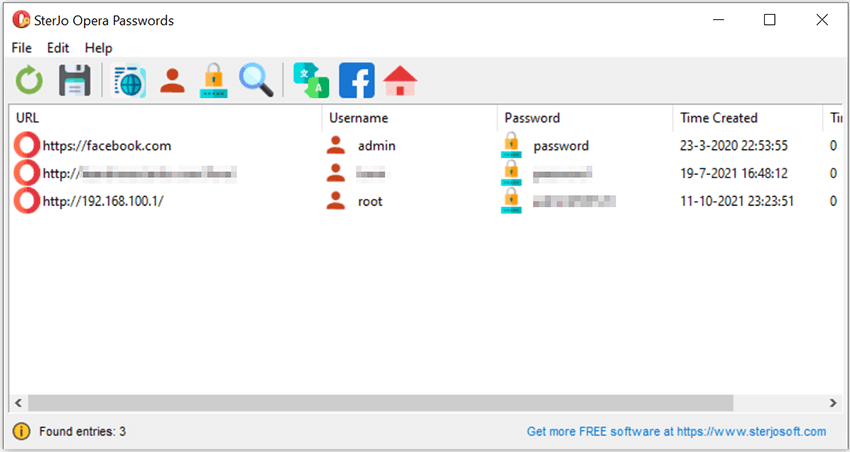
Opera (Chromium-based) stores saved logins in an encrypted database inside your Windows profile. SterJo Opera Passwords locates the Opera profile folder, decrypts the credential database using the Windows DPAPI key, and displays all saved usernames and passwords in seconds.
Step-by-Step: Recover Saved Opera Passwords
- Download SterJo Opera Passwords from the link below.
- Run the tool — it auto-detects your Opera installation.
- View the full list of recovered logins and associated URLs.
- Search by website name or username using the search box.
- Export results to HTML or CSV for backup or password manager import.
Key Features
- Recovers all usernames and passwords saved in Opera browser
- Displays website URL for each credential entry
- One-click copy of usernames and passwords to clipboard
- Export to TXT, HTML or KeePass-compatible CSV
- 100% offline — no internet access required
- Portable version available for use without installation
- Compatible with Windows XP through Windows 11
Download SterJo Opera Passwords
📥 SterJo Opera Passwords v2.0 (1.9 MB)
Download Installer Portable Version✓ Free forever | ✓ Windows XP – 11 (32/64-bit) | ✓ No account required
Version History
Version 2.0: UI improvements and removal of .OCX and some DLL dependencies.
Version 1.5: Added support for the latest Opera browser encryption.
Version 1.4: Fixed an "Overflow" bug and made minor changes.
Version 1.3: Added export to HTML and KeePass (.csv) and display of password creation times.
Version 1.2: Bug fixes.
Version 1.1: Added multi-language support.
Version 1.0: First public release.
Common Use Cases
- Changing computers — Export all Opera logins before switching to a new PC.
- Password manager migration — Move from Opera's built-in storage to KeePass or Bitwarden.
- Forgotten password — Opera saved it but you can't find it in the browser interface.
- Pre-reinstall backup — Save all credentials before reinstalling Windows.
How Opera Stores Passwords
Opera is built on the Chromium engine — the same open-source base used by Google Chrome, Microsoft Edge, Vivaldi and Brave. As a result, Opera stores saved passwords in exactly the same format as Chrome: an SQLite database named Login Data, located inside the Opera browser's user profile folder.
Passwords in this file are encrypted using the Windows Data Protection API (DPAPI), which ties the encryption to the current Windows user account. SterJo Opera Passwords reads this file and uses the same Windows user context to decrypt and display the stored credentials.
The Opera profile folder is located at: %AppData%\Opera Software\Opera Stable
Migrating Opera Passwords to Another Browser
If you're switching from Opera to Chrome, Edge or Firefox, recovering your saved passwords first lets you transfer them to the new browser:
- Use SterJo Opera Passwords to export your credentials to CSV format.
- In Chrome, go to
chrome://settings/passwordsand use the import from CSV option. - In Edge, go to
edge://settings/passwordsand import the CSV file. - For Firefox, use a CSV-to-Firefox import extension or a password manager as an intermediate step.
Frequently Asked Questions
Does SterJo Opera Passwords work with the latest Opera versions?
Yes. The tool supports the latest Opera encryption methods and works as long as Opera is installed on the system.
Can I export recovered Opera passwords?
Yes. You can export all credentials to TXT, HTML for easy reading, or to a KeePass-compatible CSV file for import into a password manager.
Does the tool send passwords to any server?
No. SterJo Opera Passwords works completely offline. Your credentials never leave your PC.
Do I need Opera installed to recover passwords?
No, as long as the Opera profile exist on the system so the tool can read its encrypted login database.
Which Windows versions are supported?
Windows XP, Vista, 7, 8, 10 and 11 in both 32-bit and 64-bit editions.
How is Opera's password storage different from Chrome's?
Both use the same DPAPI-encrypted SQLite Login Data format. The only difference is the profile folder location. SterJo Opera Passwords knows where to look for the Opera-specific profile path.
Is the tool safe to use?
Yes. It reads locally stored browser data only. No data is transmitted anywhere — all processing happens on your PC.
Can I export Opera passwords to a password manager?
Yes. Export to CSV format and import into your preferred password manager. Most password managers (Bitwarden, 1Password, KeePass) support CSV import.
Does it work on Windows 11?
Yes. Compatible with Windows XP through Windows 11 on both 32-bit and 64-bit systems.
Is it free?
Yes. SterJo Opera Passwords is completely free to download and use with no registration required.
Safe & Legal Use
This tool is for recovering credentials on devices and accounts you own. Terms of Use | Privacy Policy
📋 Popular Password Guides
- Wi-Fi How to Find Any Saved Wi-Fi Password
- Product Keys Backup Keys Before Reinstalling Windows
- Security Detect Unauthorized Network Access
- Chrome Recover Saved Chrome Passwords
- Windows Windows Credential Manager Explained
