WiFi Password Finder – Show & Recover Saved WiFi Passwords on Windows
SterJo Wireless Passwords is a free WiFi password finder for Windows that helps you show, find and recover saved WiFi passwords in seconds. If you forgot your WiFi password, this tool displays the password stored on your computer without hacking or cracking any network. It is safe, portable and works on all Windows versions.
Quick, safe Wi-Fi password recovery
- Show saved WiFi passwords on Windows
- Find WiFi password when you forgot it
- WiFi password finder without hacking
- Recover password on WiFi networks already connected
- Export WiFi passwords to text or CSV
- Portable WiFi password tool – no installation
- Supports Windows XP, 7, 8, 10 and 11
SterJo Wireless Passwords scans stored connection profiles and system settings to display SSID (network name), saved password (where available), authentication type and encryption method. It does not attempt to break network security — it only reveals credentials that were previously stored on the scanned machine. Export results to a text file for safekeeping.
How SterJo Wireless Passwords works
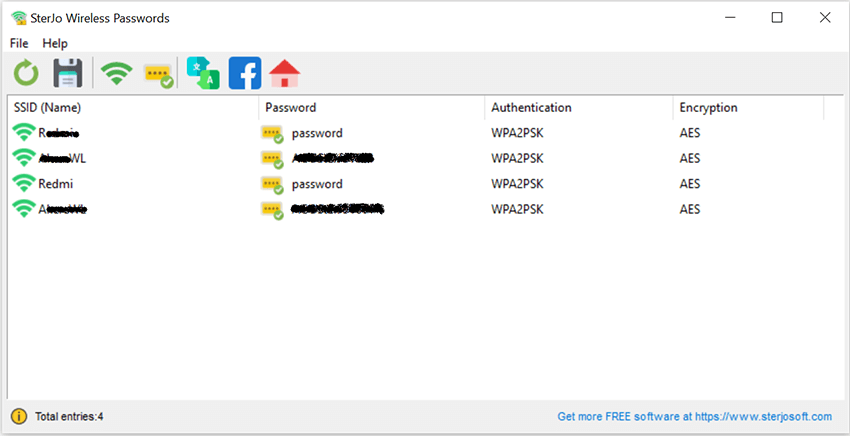
SterJo Wireless Passwords lists saved wireless connections and their stored credentials.
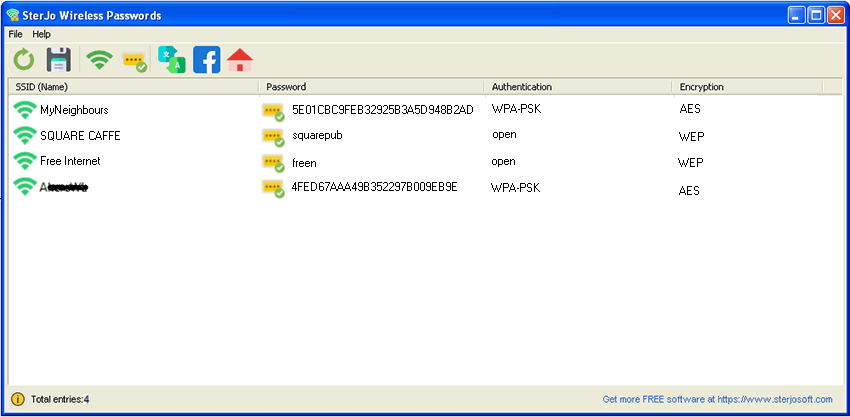
Forgot My WiFi Password? Here's How to Find It
If you forgot your WiFi password, SterJo Wireless Passwords can help you find it instantly. Windows stores the password for every network you previously connected to, and this WiFi password finder shows it in clear text so you can reuse it on another device or share it.
Before Changing Your WiFi Password, Try Recovering It
Many users change their WiFi password because they think it is lost. Before changing your WiFi password, try recovering it with SterJo Wireless Passwords. In most cases, the original password is still stored in Windows and can be shown instantly.
Download & Install
📥 Download SterJo Wireless Passwords v2.0 (2.3 MB)
Download Installer Portable Version✓ Works on Windows 11, 10, 8, 7, Vista, XP (32/64-bit)
Installing is simple: download the installer or portable ZIP, extract (if applicable) and run WiFiPasswords.exe.
Notice for Windows XP users: If your network uses WPA, Windows XP may display the saved credential as 64 HEX digits. The HEX key can be used to connect to the network — this behavior is expected. WEP keys are shown normally on XP. Vista, 7, 8, 10 and 11 do not display WPA hex in the same way.
System Requirements
SterJo Wireless Passwords runs on Windows XP, Vista, 7, 8, 10 and 11 (32-bit and 64-bit versions where applicable).
Version History
Version 2.0 — UI improvements and removed .OCX dependencies
Version 1.7 — Minor bug fixes.
Version 1.6 — Windows 10 compatibility improvements.
Version 1.5 — Multi-language support added.
Version 1.4 — Minor changes.
Version 1.3 — Export to HTML and CSV/KeePass formats.
Version 1.2 — Minor bug fix.
Version 1.1 — Bug fixes.
Version 1.0 — First public release.
When You Need WiFi Password Recovery
- Sharing your WiFi password — A guest or family member needs the password for your home network and you've forgotten it since setup.
- Connecting a new device — You need to enter the WiFi password on a phone, tablet, smart TV or IoT device but can't remember the string you set years ago.
- Setting up a new router — Configuring a replacement router with the same WiFi password as the old one (to avoid reconfiguring all devices).
- Migrating to a new PC — The new PC needs to connect to all the same networks the old one did — recover all saved passwords at once.
- IT support — A technician needs to connect a user's replacement laptop to the office WiFi without bothering the network administrator.
Frequently Asked Questions
Is it safe to use this WiFi password finder?
Yes. This WiFi password finder only reads saved wireless profiles from your local Windows system. It does not crack networks or send data online. It is completely safe when downloaded from the official SterJo website.
Can I run SterJo Wireless Passwords from a USB stick?
Yes. Use the portable build to run the tool without installing it on the host PC.
I forgot my WiFi password. What should I do?
If you forgot your WiFi password, use SterJo Wireless Passwords to find it. If your computer was connected before, Windows still stores the password and it can be shown instantly without changing the network settings.
Should I change my WiFi password or try to recover it?
Before changing your WiFi password, try recovering it with a WiFi password finder. In most cases, the original password is still saved in Windows and can be shown immediately.
What should I do if no wireless networks are displayed?
This usually means no Wi-Fi profiles are saved, the program isn’t running as administrator, or the Windows WLAN service is disabled.
How can I find or show my WiFi password in Windows?
You can find and show your WiFi password in Windows using SterJo Wireless Passwords. If you forgot your WiFi password but your computer connected before, the password is still stored and can be displayed instantly.
Can I see the WiFi password of the network I am currently connected to?
Yes. This WiFi password finder can show the WiFi password of your current network as long as Windows has saved the wireless profile.
Does SterJo Wireless Passwords work on Windows 10 and Windows 11?
Yes. The software fully supports Windows XP, Vista, 7, 8, 10, and Windows 11, including both 32-bit and 64-bit systems.
Can I find WiFi passwords for networks I am no longer connected to?
Yes. You can still find WiFi passwords for old networks if Windows has stored the wireless profile. The WiFi password finder will display them even if the network is out of range.
Is this a WiFi password hacking or cracking tool?
No. This is not a hacking tool. It only shows WiFi passwords already saved on your computer. It cannot break into or access protected networks.
Can I export or save recovered wireless passwords?
Yes. SterJo Wireless Passwords lets you export Wi-Fi passwords to a text file, making it easy to back up or transfer them to another device.
Is SterJo Wireless Passwords portable?
Yes. The tool is 100% portable and does not require installation. You can run it directly from a USB flash drive
Will antivirus software flag this Wi-Fi password recovery tool?
Some antivirus programs may detect false positives because the tool accesses stored credentials. Downloading SterJo Wireless Passwords from the official website ensures it is safe and unmodified.
Does SterJo Wireless Passwords modify system files or network settings?
No. The software is read-only and does not modify registry entries, system files, or wireless configurations.
Can I generate a new strong WiFi password with SterJo tools?
Yes. Use SterJo Wireless Key Generator to generate a cryptographically strong random WiFi password for WEP, WPA or WPA2, then set it on your router and use SterJo Wireless Passwords to recover it if you ever forget it again.
Does the tool send any data externally?
No. SterJo Wireless Passwords reads local Windows WLAN profiles and decrypts them entirely on your PC. No data is transmitted to any server.
Is it free?
Yes. SterJo Wireless Passwords is completely free to download and use with no registration required.
Safe & Legal Use
This tool is intended for use on devices and accounts you own or are authorized to manage. Terms of Use | Privacy Policy
📋 Popular Password Guides
- Wi-Fi How to Find Any Saved Wi-Fi Password
- Product Keys Backup Keys Before Reinstalling Windows
- Security Detect Unauthorized Network Access
- Chrome Recover Saved Chrome Passwords
- Windows Windows Credential Manager Explained
