SterJo Wireless Key Generator – Generate Secure WiFi Passwords for WEP, WPA & WPA2
SterJo Wireless Key Generator is a free, lightweight Windows tool that generates strong, random wireless security keys for WEP, WPA and WPA2 networks. The generated keys use cryptographically random character combinations in ASCII or HEX format — making them virtually impossible to crack with brute-force attacks. Copy the generated key directly to your clipboard and paste it into your router settings in seconds.
How SterJo Wireless Key Generator Works
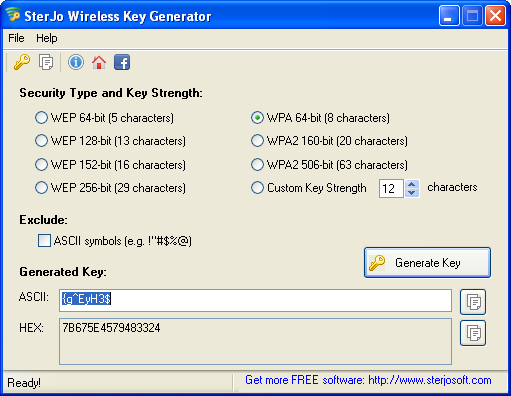
The tool uses a random character selection algorithm to build a WiFi key from your chosen character set (letters, numbers, special characters) at the key length you specify — up to 63 characters for WPA/WPA2. A 63-character WPA2 key is essentially unbreakable with current computing technology. Once generated, the key is displayed on screen with a one-click copy button for immediate use in your router configuration panel.
Step-by-Step: Generate a Secure WiFi Password
- Download SterJo Wireless Key Generator below.
- Select your WiFi security type (WEP, WPA or WPA2).
- Choose your desired key length (longer = more secure).
- Click Generate to create a random, strong password.
- Copy the key with one click and paste it into your router admin panel.
Key Features
- Generates random WiFi keys for WEP, WPA and WPA2 networks
- Supports both ASCII and HEX key formats
- Adjustable key length — up to 63 characters for WPA/WPA2
- One-click clipboard copy for instant router configuration
- Offline key generation — no internet required
- Completely free and portable
- Compatible with Windows XP through Windows 11
Download SterJo Wireless Key Generator
📥 SterJo Wireless Key Generator v1.0 (1.7 MB)
Download Installer Portable Version✓ Free forever | ✓ Windows XP – 11 (32/64-bit) | ✓ No account required
Version History
Version 1.0: First public release.
Why You Need a Strong WiFi Password
Weak WiFi passwords are one of the most common ways unauthorized users gain access to home and office networks. Simple dictionary words, birthdays or short passwords can be cracked in minutes with freely available tools. A randomly generated 12+ character WPA2 key using mixed characters would take thousands of years to crack by brute force, even with modern hardware.
After setting a new WiFi password, you may need to reconnect all your devices. If you ever forget your new password, use SterJo Wireless Passwords to recover it from any Windows PC that has connected to the network.
WiFi Security Types Explained
WEP (Wired Equivalent Privacy) — An older, now insecure standard. Avoid if possible. WEP keys can be cracked in minutes.
WPA (Wi-Fi Protected Access) — Better than WEP but still has known vulnerabilities. Use WPA2 or WPA3 if your router supports it.
WPA2 (Wi-Fi Protected Access 2) — The current standard for most home and office networks. A long, random WPA2 key is extremely secure.
Related tools: SterJo Strong Password Generator | SterJo Wireless Passwords
Frequently Asked Questions
What is the most secure WiFi key length to generate?
For WPA2 networks, use the maximum 63-character length with a mix of uppercase letters, lowercase letters, numbers and special characters. This creates a key that is computationally impossible to crack within any realistic timeframe.
Can I use the generated key on any router?
Yes. The generated ASCII or HEX keys are compatible with any standard WiFi router that supports WEP, WPA or WPA2 security. Enter the key in your router's wireless security settings.
Are the generated keys truly random?
Yes. The tool uses random character selection to generate keys that have no predictable pattern, making them resistant to dictionary attacks and brute-force cracking.
Is the tool free to use?
Yes. SterJo Wireless Key Generator is completely free to download and use with no registration required.
Should I use ASCII or HEX format for my WiFi key?
ASCII keys are easier to type manually on devices. HEX keys are required by some older hardware. For modern routers and devices, ASCII with mixed characters provides the strongest password while remaining typeable.
What if I forget the new WiFi password after changing it?
Use SterJo Wireless Passwords on any Windows PC that has previously connected — it will show the saved WiFi password instantly. Alternatively, log into the router admin panel to view the current password.
How is this different from SterJo Strong Password Generator?
SterJo Strong Password Generator is a general-purpose password generator for any use case. SterJo Wireless Key Generator is specifically designed for WiFi keys — it understands WPA/WPA2 key length requirements and HEX vs ASCII formats relevant to wireless security configuration.
Does it require an internet connection?
No. All key generation happens locally on your PC. No internet connection is needed.
📋 Popular Password Guides
- Wi-Fi How to Find Any Saved Wi-Fi Password
- Product Keys Backup Keys Before Reinstalling Windows
- Security Detect Unauthorized Network Access
- Chrome Recover Saved Chrome Passwords
- Windows Windows Credential Manager Explained
