SterJo Browser Passwords – Recover Saved Browser Passwords
SterJo Browser Passwords is a free and easy-to-use Windows tool that instantly recovers forgotten usernames and passwords saved by your web browser. Whether you use Chrome, Firefox, Edge, Internet Explorer, Opera, Vivaldi, Brave or other Chromium and Mozilla-based browsers, the software can reveal stored login information with a single click.
How SterJo Browser Passwords Works
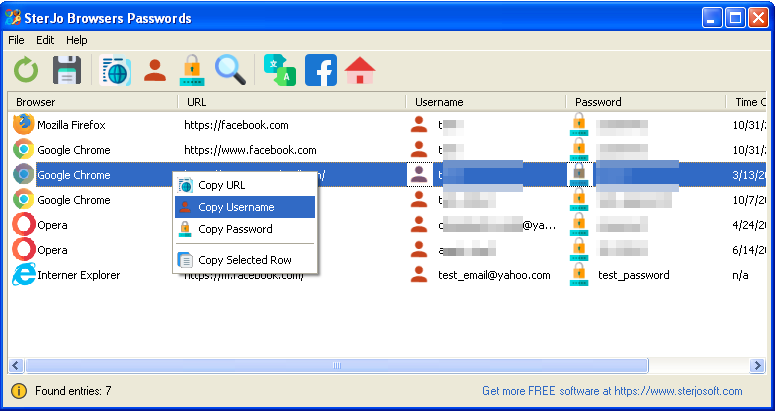
SterJo Browser Passwords scans the browser’s internal password storage and displays the website URL, username, password, and which browser saved the credentials. All recovered logins can be exported to a text file for backup or future reference.
Step-by-Step: Recover All Browser Passwords
- Download SterJo Browser Passwords using the link below.
- Run the application — portable version needs no installation.
- The tool automatically scans all supported browser profiles on the current Windows user account.
- All found credentials are displayed with website URL, username and password.
- Filter by browser or search by site name to find specific entries quickly.
- Copy any password to the clipboard, or export all results.
Download & Install
📥 Download SterJo Browser Passwords v2.0 (2.3 MB)
Download Installer Portable Version✓ Works on Windows 11, 10, 8, 7, Vista, XP (32/64-bit)
Looking for single-browser password tools? Try SterJo Edge Passwords, SterJo Chrome Passwords, SterJo Firefox Passwords, or explore more utilities on our Products page.
Version History
Version 2.0: UI changes and removed .OCX and some .DLL dependencies.
Version 1.7: Minor changes and added support for Firefox ESR 32-bit.
Version 1.6: Added support for the latest Microsoft Edge browser based on Chromium.
Version 1.5: Added support for the latest encryption on Chrome, Opera, Vivaldi and Brave browser.
Version 1.4: New browsers included: Brave Browser, Epic Privacy Browser and Torch.
Version 1.3: Bug fixes.
Version 1.2: Fixed "OverFlow" bug appearing on some systems and added support for Yandex browser.
Version 1.1: Added multi-language support and now displays the passwords of Vivaldi Web browser.
Version 1.0: First public release.
Supported Browsers
SterJo Browser Passwords recovers saved credentials from the following browsers:
- Google Chrome — Full support including current versions.
- Mozilla Firefox — 32-bit builds. Firefox 64-bit may show blank results due to decryption library differences.
- Microsoft Edge — Both the Chromium-based version and Legacy Edge.
- Opera — Chromium-based Opera browser.
- Vivaldi — Chromium-based Vivaldi browser.
- Brave Browser — Chromium-based, full support.
- Epic Privacy Browser — Chromium-based.
- Torch Browser — Chromium-based.
- Internet Explorer — Reads IE-stored credentials from Windows Protected Storage.
How Browsers Store Passwords
Chromium-based browsers (Chrome, Edge, Opera, Vivaldi, Brave and others) store saved passwords in an SQLite database called Login Data located in each browser's user profile folder. The passwords in this file are encrypted using Windows DPAPI (Data Protection API), which ties the encryption to the current Windows user account. SterJo Browser Passwords reads this database and uses the same Windows user context to decrypt the passwords.
Mozilla Firefox uses a different system — it stores credentials in a logins.json file, with encryption keys in key4.db. The decryption uses Mozilla's NSS (Network Security Services) libraries. This is why Firefox 64-bit builds require 32-bit decryption compatibility — the encryption libraries are version-specific.
Browser Passwords vs. Individual Browser Tools
SterJo Software offers both an all-in-one Browser Passwords tool and dedicated per-browser tools:
- SterJo Browser Passwords (this tool) — Best when you want to see all saved passwords across every browser in a single scan, or when you're not sure which browser saved a specific password.
- SterJo Chrome Passwords — Dedicated Chrome tool with Chrome-specific features.
- SterJo Firefox Passwords — Dedicated Firefox tool.
- SterJo Edge Passwords — Dedicated Microsoft Edge tool.
- SterJo Opera Passwords — Dedicated Opera tool.
For most users, the all-in-one Browser Passwords tool is the most convenient starting point — it covers everything in one scan.
Frequently Asked Questions
Which browsers are supported?
The tool supports Chrome, Firefox, Edge, Internet Explorer, Opera, Vivaldi, Brave, Torch and other Chromium-based browsers.
Does SterJo Browser Passwords send recovered data anywhere?
No. All operations happen locally on your computer. No information is uploaded or stored externally.
Can it recover passwords from private or incognito browsing sessions?
No. Private browsing modes do not save passwords, so recovery is not possible.
Why are Firefox passwords sometimes blank?
Firefox 64-bit uses different encryption, and the tool supports only 32-bit decryption modules. See the provided instructions for recovering Firefox 64-bit passwords.
Can I export all recovered passwords?
Yes. Click the save button to export all recovered logins into a text file.
Why is my Firefox password not showing?
Firefox 64-bit uses different encryption libraries than the 32-bit version. SterJo's Firefox decryption module is 32-bit and cannot read Firefox 64-bit credentials directly.
Is the tool safe to use?
Yes. It only reads locally stored browser data and does not transmit any information externally. All processing happens on your PC.
Does it work with browser sync?
The tool reads the locally stored copy of browser passwords on your PC. Synced passwords are stored locally in the same database as locally saved ones — they will appear in the results regardless of whether sync is enabled.
Safe & Legal Use
This tool is intended for recovering your own saved credentials from your own device. Terms of Use | Privacy Policy
📋 Popular Password Guides
- Wi-Fi How to Find Any Saved Wi-Fi Password
- Product Keys Backup Keys Before Reinstalling Windows
- Security Detect Unauthorized Network Access
- Chrome Recover Saved Chrome Passwords
- Windows Windows Credential Manager Explained
