SterJo Edge Passwords – Free Microsoft Edge Password Recovery for Windows
SterJo Edge Passwords is a free, portable Windows utility that instantly recovers all usernames and passwords saved by Microsoft Edge. It decrypts locally stored Edge credentials and displays them in a clean, searchable table with the associated website URL. You can export the results to TXT, HTML or CSV for backup or migration to a password manager.
The entire process runs 100% offline on your own computer. No data is transmitted externally.
How SterJo Edge Passwords Works
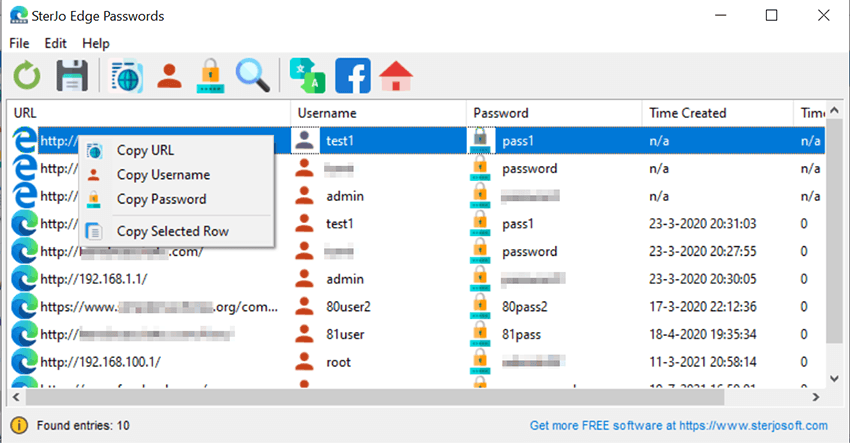
Microsoft Edge (Chromium-based) stores saved logins in an encrypted database inside your Windows user profile at %LocalAppData%\Microsoft\Edge\User Data\Default\Login Data. SterJo Edge Passwords locates this database, decrypts it using the Windows DPAPI key, and displays all saved credentials in seconds — sorted by URL and ready to export.
Step-by-Step: Recover Microsoft Edge Passwords
- Download SterJo Edge Passwords from the link below.
- Run the tool — it automatically finds your Edge profile.
- View the complete list of recovered usernames, passwords and URLs.
- Search for a specific website using the built-in search box.
- Export the credentials to TXT, HTML or CSV as needed.
Key Features
- Recovers all usernames and passwords saved by Microsoft Edge (Chromium)
- Displays website URL and usage information for each credential
- One-click copy of any password to clipboard
- Export to HTML or KeePass-compatible CSV format
- Works with Edge on Windows 10 and Windows 11
- 100% offline — no internet connection required
- Portable — runs from a USB drive without installation
- Compatible with Windows 7 through Windows 11 (32 & 64-bit)
Download SterJo Edge Passwords
📥 SterJo Edge Passwords v2.1 (2.0 MB)
Download Installer Portable Version✓ Free forever | ✓ Windows 7 – 11 (32/64-bit) | ✓ No account required
Version History
Version 2.1: Removed more .DLL dependencies.
Version 2.0: UI changes and removed .OCX dependencies.
Version 1.3: Added support for the latest Microsoft Edge browser based on Chromium.
Version 1.2: Added export to HTML (.html) and KeePass file (.csv).
Version 1.1: Added multi-language support.
Version 1.0: First public release.
When Would You Use This Tool?
- New PC setup — Migrating your Edge logins to a new computer before decommissioning the old one.
- Password manager migration — Moving from Edge's built-in password manager to KeePass, Bitwarden or similar.
- Forgotten password — Edge has the password saved but autofill stopped working after an update.
- Before reinstalling Windows — Back up all Edge credentials before a clean install.
- Account recovery — Helping a family member or colleague recover access to their own accounts.
Edge Password Recovery vs. Edge's Built-In Settings
Edge lets you view saved passwords, but it asks for your Windows account password each time you reveal an individual entry. SterJo Edge Passwords decrypts all credentials at once in a sortable, exportable table — with no repeated confirmation dialogs. It also works when Edge is damaged or when you need to access credentials from a backed-up Edge profile.
Also see: Chrome Password Recovery | Firefox Password Recovery | Complete Edge Password Recovery Guide
Edge vs Chrome Password Recovery
Both browsers use the same underlying storage format (DPAPI-encrypted SQLite), but their profile folders are in different locations. SterJo Edge Passwords knows the exact path for Edge profiles, while SterJo Chrome Passwords targets Chrome's profile location. If you use both browsers, run both tools to get a complete picture of all locally saved passwords.
Frequently Asked Questions
Does SterJo Edge Passwords work with the new Chromium-based Edge?
Yes. This tool has a full support for the Chromium-based Microsoft Edge available on Windows 10 and Windows 11.
Can I export recovered Edge passwords?
Yes. You can export all recovered credentials to an HTML file or a KeePass-compatible CSV for importing into a password manager.
Does the tool upload any passwords?
No. SterJo Edge Passwords operates entirely offline. Your credentials never leave your computer.
What if Edge is not installed on my computer?
The tool requires an Edge profile to exist on the computer. If Edge has never been used to save passwords on that machine, there will be nothing to recover.
Which Windows versions are supported?
SterJo Edge Passwords works on Windows 7, 8, 10 and 11 in both 32-bit and 64-bit editions.
Does it work with Legacy Edge on Windows 10?
The original EdgeHTML-based Edge (pre-2020) used a different storage format. Check the current version notes for Legacy Edge support details.
What about passwords synced via Microsoft account?
Edge stores a local encrypted copy of synced passwords. The tool reads this local copy, so synced passwords that have been downloaded to this PC are recoverable.
Does Edge use a master password?
Edge does not support a traditional master password like Firefox. Encryption is tied to your Windows login credentials via DPAPI — the tool must run under the same Windows user account to decrypt the stored passwords.
Is the tool safe to use?
Yes. It reads locally stored browser data only and does not transmit any information externally.
Is it free?
Yes. SterJo Edge Passwords is completely free to download and use.
Safe & Legal Use
This tool is intended for recovering credentials on devices and accounts you own or are authorized to manage. Terms of Use | Privacy Policy
