SterJo NetStalker – Free Network Monitor & Software Firewall for Windows
SterJo NetStalker is a free Windows tool that shows all active network connections in real time — including which application owns each connection. It works as a lightweight software firewall and network activity monitor, letting you create rules to allow or block specific programs from accessing the internet.
How SterJo NetStalker Works
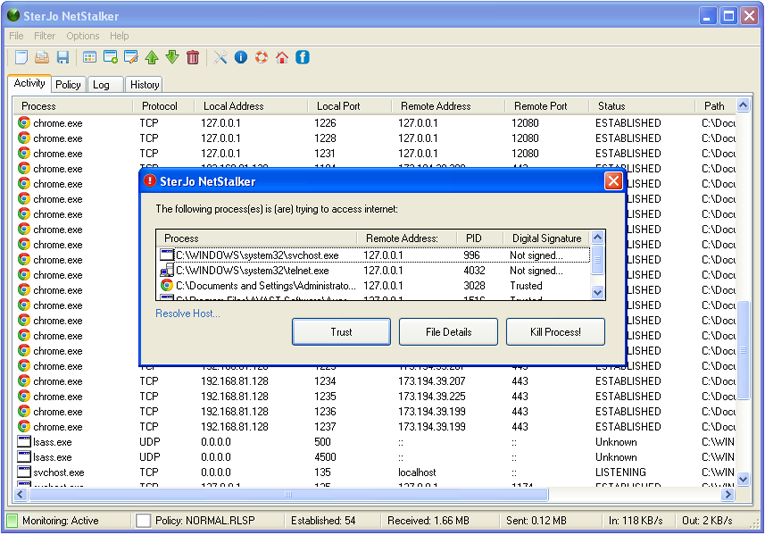
NetStalker monitors TCP and UDP connections continuously. For each connection it shows the local and remote address, port, protocol, connection state (ESTABLISHED, LISTENING, TIME_WAIT, etc.), and the process name responsible. You can set policy rules to automatically allow or block any application from making network connections.
Step-by-Step: Monitor Your Network Activity
- Download SterJo NetStalker using the link below.
- Run as administrator for full process visibility.
- The connection list shows all active network activity in real time.
- Look for unfamiliar process names or unexpected remote addresses.
- Right-click any entry to search Google for the process or create a block rule.
- Use the Policy Rules tab to permanently allow or block applications.
Key Features of NetStalker
- Real‑time connection monitor: See every TCP/UDP connection updated every second.
- Process details: Full path to the executable, PID, and company name (if available).
- Whois lookup: Right‑click any remote IP to perform a quick whois query.
- Interactive alerts: When a new (uncached) program connects, a pop‑up asks you to allow or block it, or create a permanent rule.
- Policy rules: Create allow/block rules based on executable path, IP address, or port.
- Portable: Run it from a USB stick – no installation needed.
- Low resource usage: Minimal CPU and memory footprint.
Download & Install
📥 Download SterJo NetStalker v1.4 (2.2 MB)
Download Installer Portable Version✓ Works on Windows 11, 10, 8, 7, Vista, XP (32/64-bit)
Download the installer or portable version to start monitoring your PC immediately. SterJo NetStalker supports both 32-bit and 64-bit versions of Windows XP through Windows 11.
Version history
Version 1.4: Minor bug fixes and improvements.
Version 1.3: Minor changes and bug fixes.
Version 1.2: Fixed flickering while refreshing connections.
Version 1.1: Minor updates.
Version 1.0: First public release.
Understanding TCP Connection States
NetStalker displays the state of each TCP connection. Knowing these helps you interpret network activity:
| State | Meaning |
|---|---|
| ESTABLISHED | Active connection – data can flow. |
| LISTENING | Server waiting for incoming connections (your PC is offering a service). |
| CLOSE_WAIT | Remote side closed the connection; waiting for local app to close. |
| TIME_WAIT | Connection closed, but ports are held briefly to handle delayed packets. |
| SYN_SENT | Actively trying to establish a connection. |
| FIN_WAIT | Closing connection, waiting for acknowledgment. |
UDP is stateless, so NetStalker shows them as "UDP" with no state.
Creating Policy Rules: Block or Allow
To permanently block a program (e.g., an updater you don't want phoning home):
- In the Activity tab, right‑click any connection from that program.
- Select "Add to policy" or go to the Policy tab and click "Add".
- Browse to the executable file (.exe).
- Optionally restrict by remote IP/port.
The program will be blocked immediately and on every subsequent run. Allowed rules work the same way.
Frequently Asked Questions
What does SterJo NetStalker do?
SterJo NetStalker monitors all TCP and UDP connections to your PC, detects unauthorized access, and alerts you to suspicious activity to maintain your PC security and network protection.
Is SterJo NetStalker a software firewall?
SterJo NetStalker works as a software firewall and network monitoring program. It allows you to monitor traffic, analyze connections, and control which applications can access the network.
Is SterJo NetStalker suitable for network security monitoring?
Yes. It is widely used as a network security monitoring tool to analyze traffic, detect suspicious connections, and enhance cyber security monitoring on Windows PCs.
Does SterJo NetStalker automatically block internet traffic?
No. It monitors traffic and alerts you. You can create rules in the Policy tab to accept, block, or filter connections manually.
Which Windows versions are supported?
SterJo NetStalker supports Windows XP, Vista, 7, 8, 10, and 11 (both 32-bit and 64-bit versions).
How do I block a suspicious process?
Use the Policy tab to create a rule for the process. You can choose to block, allow, or filter connections based on your preferences.
Can I use SterJo NetStalker alongside my existing firewall?
Yes. SterJo NetStalker is a monitoring tool and works alongside standard firewalls without conflicts.
Does SterJo NetStalker run in the background automatically?
Yes. Once launched, it continuously monitors network activity until you close the application.
How do I update SterJo NetStalker?
Updates can be downloaded from the official website. Simply replace the old version with the new installer or use the updated portable version.
Is my data safe with SterJo NetStalker?
Yes. The software only monitors connections locally on your PC and does not collect or send personal data.
Can I export the logs?
Yes. Logs and history can be saved and reviewed later to track all network activity for better security management.
Can NetStalker block connections?
NetStalker is a monitoring and visibility tool — it shows connections but does not block them. To block specific applications from accessing the network, use Windows Firewall or a third-party firewall.
Does it work on Windows 11?
Yes. SterJo NetStalker is compatible with Windows XP through Windows 11.
Can it detect if my PC is being used as a remote access host?
If remote access software (legitimate or otherwise) is running and listening for connections, it will appear in NetStalker as a LISTENING entry. Unfamiliar processes in LISTENING state are worth investigating.
What ports do common applications use?
Common ports: HTTP (80), HTTPS (443), FTP (21), SMTP (25/587), IMAP (143/993), DNS (53), RDP/Remote Desktop (3389). Connections on well-known ports to recognizable services are generally legitimate.
How often does NetStalker refresh the connection list?
The connection list updates in real time, reflecting active and new connections as they are established and closed.
Does it require administrator privileges?
For the most complete connection view, including all process names, running with administrator privileges is recommended.
Is SterJo NetStalker portable?
Yes. A portable version is available that runs without installation.
Is it free?
Yes. SterJo NetStalker is completely free to download and use.
📋 Popular Password Guides
- Wi-Fi How to Find Any Saved Wi-Fi Password
- Product Keys Backup Keys Before Reinstalling Windows
- Security Detect Unauthorized Network Access
- Chrome Recover Saved Chrome Passwords
- Windows Windows Credential Manager Explained
