SterJo Strong Password Generator – Free Secure Password Generator for Windows
SterJo Strong Password Generator is a free, lightweight Windows tool that generates strong, random passwords using fully customizable character sets. You can generate a single password for personal use or create large bulk lists of random passwords and license keys — perfect for developers, IT administrators and security-conscious users.
How SterJo Strong Password Generator Works
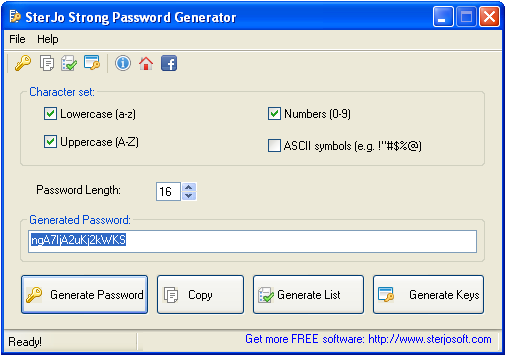
The generator combines letters (uppercase and lowercase), numbers and special characters in random combinations of your chosen length. The randomness is cryptographically strong, meaning passwords have no patterns that could be exploited by cracking algorithms. You define the character set and length — the tool does the rest instantly.
Step-by-Step: Generate a Strong Password
- Download SterJo Strong Password Generator below.
- Choose your character set (letters, numbers, symbols, or all).
- Set the password length (16+ characters recommended).
- Choose the quantity — single password or bulk list.
- Click Generate and copy your new strong password.
Key Features
- Generates single passwords or large bulk password lists
- Fully customizable character sets (letters, numbers, symbols)
- Adjustable password length for any security requirement
- Built-in license key generator for software developers
- Generates unlock codes and serial numbers for shareware applications
- One-click clipboard copy
- Offline generation — no internet needed
- Portable and compatible with Windows XP through Windows 11
Download SterJo Strong Password Generator
📥 SterJo Strong Password Generator v1.0 (1.6 MB)
Download Installer Portable Version✓ Free forever | ✓ Windows XP – 11 (32/64-bit) | ✓ No account required
Version History
Version 1.0: First public release.
Password Strength: What Makes a Password Uncrackable?
Password security depends on two factors: length and character variety. A 12-character password using only lowercase letters has about 95 trillion possible combinations — crackable by a modern GPU in hours. The same 12-character password using uppercase, lowercase, numbers and symbols has 475 quadrillion combinations — taking years to crack. A 20-character random password with mixed characters is effectively unbreakable with current technology.
SterJo Strong Password Generator creates passwords that maximize both length and character variety, ensuring the strongest possible protection for any purpose.
For Software Developers: License Key Generation
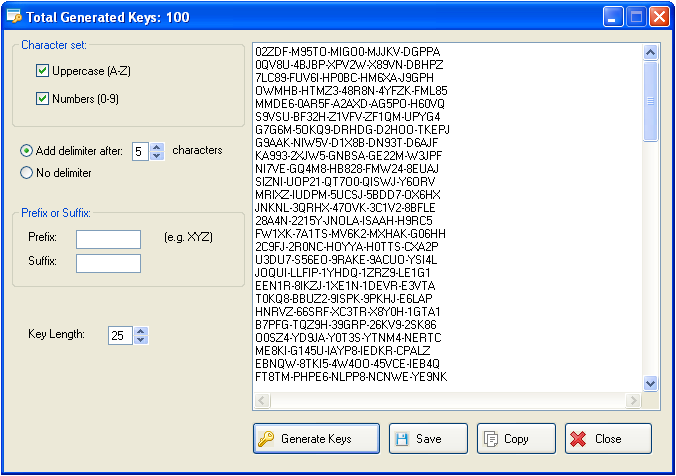
SterJo Strong Password Generator includes a dedicated license key generation mode. Developers can use it to create unique unlock codes, serial numbers and activation keys for shareware, trial software and licensed applications. Generate as many keys as needed in a single batch — all unique and random.
Frequently Asked Questions
How long should a strong password be?
For most online accounts, a minimum of 16 characters using mixed character types is recommended. For high-security applications such as encryption keys, server passwords or admin credentials, 20+ characters is advisable.
Can I generate multiple passwords at once?
Yes. SterJo Strong Password Generator allows you to generate large lists of passwords in a single batch operation — useful for bulk account creation, IT provisioning and license key generation.
Can developers use this to generate software license keys?
Yes. The built-in key generator mode lets developers create unique serial numbers and unlock codes for shareware and trial versions of their software.
Is the password generation truly random?
Yes. The tool uses random character selection with no predictable pattern, making generated passwords resistant to dictionary attacks and brute-force methods.
Is it free to use?
Yes. SterJo Strong Password Generator is completely free to download and use with no registration required.
Should I include special characters in every password?
Including special characters significantly increases the search space. Some services don't accept certain special characters — the tool lets you customize which character types to include so you can generate compliant passwords for any service.
Does the tool require an internet connection?
No. All password generation happens locally on your PC. No internet connection is needed and no generated passwords are transmitted anywhere.
What is the maximum password length I can generate?
The tool supports generating passwords up to the configured maximum length. For most use cases, 32–64 characters covers all practical security requirements.
📋 Popular Password Guides
- Wi-Fi How to Find Any Saved Wi-Fi Password
- Product Keys Backup Keys Before Reinstalling Windows
- Security Detect Unauthorized Network Access
- Chrome Recover Saved Chrome Passwords
- Windows Windows Credential Manager Explained
