SterJo Windows Vault Passwords – Instantly Reveal Saved Windows Vault Credentials
SterJo Windows Vault Passwords is a reliable tool to recover all credentials stored in Windows Vault. Easily retrieve saved usernames and passwords for applications and websites stored securely on your system.
How SterJo Windows Vault Passwords Works
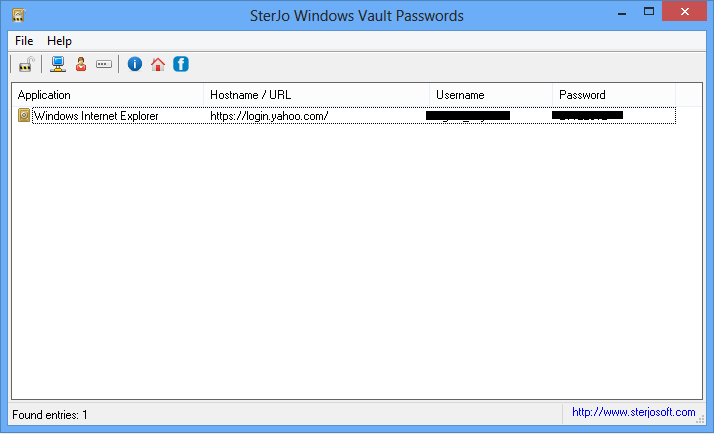
The program is user-friendly and does not require technical knowledge. Simply click the recovery button to instantly display all stored credentials from Windows Vault.
Step-by-Step: Recover Your Windows Vault Passwords
- Download SterJo Windows Vault Passwords using the link below.
- Run the application — no installation is required for the portable version.
- Click the Recover button to instantly scan and display all stored credentials.
- View results — the tool shows each entry with its website or resource name, username, and password.
- Copy any credential to the clipboard with a single click.
Download & Install
📥 Download SterJo Windows Vault Passwords v1.2 (2.3 MB)
Download Installer Portable Version✓ Works on Windows 11, 10, 8, 7, Vista, XP (32/64-bit)
Version History
v1.2 — Improved compatibility with Windows 10 and Windows 11 Credential Vault formats.
v1.1 — Added multi-language support.
v1.0 — First public release.
When Would You Need This Tool?
The Windows Vault stores credentials silently in the background. Most users don't realize how many passwords Windows has saved on their behalf until they actually need them. Common situations include:
- Migrating to a new PC — You need to transfer saved credentials for network drives, mapped folders, or intranet portals to a new computer before decommissioning the old one.
- Recovering a forgotten password — You haven't typed a network share or Remote Desktop password in years because Windows always entered it automatically. Now you need to know the actual password.
- Accessing legacy web credentials — An old password for a company intranet, router admin panel, or internal web app that was saved through Internet Explorer.
- IT administration — Auditing stored credentials on managed Windows machines as part of a security review or user account migration.
- Before formatting — Extracting all saved credentials from a Windows installation before a clean reinstall to ensure nothing is lost.
What Is Windows Vault?
Windows Vault is the user-facing name for the Windows Credential Manager, a secure storage system built into Windows that saves usernames and passwords for you. When you check "Remember my credentials" on a network share, Remote Desktop connection, or website in Internet Explorer or Edge Legacy — Windows stores those details in the Vault so you don't have to re-enter them.
The Vault is organized into two main sections:
- Web Credentials — Usernames and passwords saved by Internet Explorer and legacy Microsoft Edge when browsing websites.
- Windows Credentials — Network passwords, Remote Desktop credentials, and other application-stored logins (OneDrive, SharePoint, mapped drives, etc.).
Windows Vault vs Windows Credentials: What's the Difference?
SterJo Software offers two separate tools for Windows credential recovery, and it's worth understanding the difference:
SterJo Windows Vault Passwords (this tool) focuses on the Vault's web credentials and certificate-based entries — particularly those saved through Internet Explorer and older Edge. It is the right choice when you need to recover passwords for websites and web-based applications that were accessed through Microsoft's legacy browsers.
SterJo Windows Credentials focuses on Windows Credentials — network passwords, Remote Desktop logins, and credentials used by Windows applications like OneDrive. If you need to recover a mapped drive password or a Remote Desktop password, start there.
When in doubt, try both tools — they cover different parts of the Credential Manager and together give you a complete picture of what Windows has stored.
Frequently Asked Questions
Which Windows versions are supported?
SterJo Windows Vault Passwords works on Windows 7, Windows 8, Windows 10 and Windows 11 where Credential Vault is available.
Is it safe to use?
Yes. SterJo Windows Vault Passwords reads credentials stored in Windows Vault locally. No data is sent over the internet.
Do I need technical experience?
No technical experience is needed. The tool has a simple interface with only a few buttons to recover your credentials instantly.
Can I recover credentials for websites and apps?
Yes, the tool can recover saved usernames and passwords for applications and websites that store credentials in Windows Vault.
Why don't I see all my passwords?
The Windows Vault only contains credentials that were specifically saved through Windows' credential-saving mechanisms — like checking "Remember my credentials" on a Windows prompt. Passwords saved inside browsers like Chrome or Firefox are stored separately and require browser-specific tools such as SterJo Chrome Passwords.
Can I use this tool to recover Remote Desktop passwords?
Remote Desktop credentials are typically stored in the Windows Credentials section of Credential Manager. For those, the SterJo Windows Credentials tool is a better fit.
Can I export the recovered credentials?
The tool displays all credentials on screen where you can copy them individually. Check the current version for available export options.
Will antivirus software flag this tool?
Some security tools may generate false positives for credential recovery utilities. Always download from the official SterJo website and verify the file with your antivirus before running.
Safe & Legal Use
This tool is intended for use on devices and accounts you own or are authorized to manage. Terms of Use | Privacy Policy
📋 Popular Password Guides
- Wi-Fi How to Find Any Saved Wi-Fi Password
- Product Keys Backup Keys Before Reinstalling Windows
- Security Detect Unauthorized Network Access
- Chrome Recover Saved Chrome Passwords
- Windows Windows Credential Manager Explained
