SterJo Chrome History – Free Google Chrome History Viewer & Exporter
SterJo Chrome History is a free, lightweight Windows tool that lets you view, search and export your entire Google Chrome browsing history in seconds. For each visited website, the tool displays the full URL, page title, visit count and last visit timestamp — all in a clean, sortable table that you can search and filter instantly.
How SterJo Chrome History Works
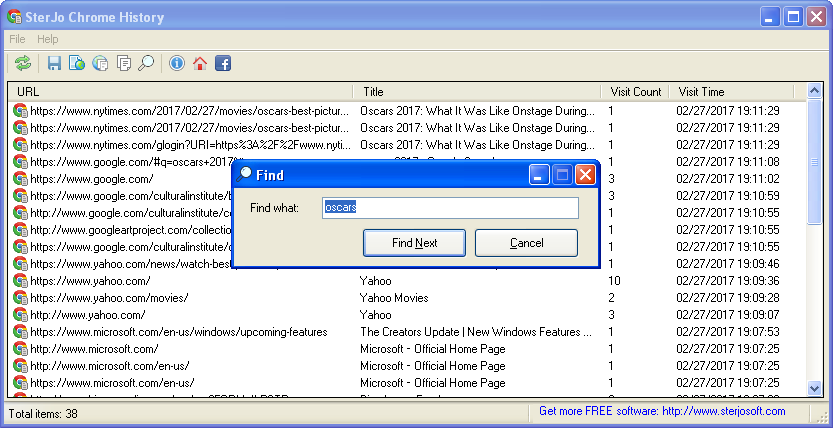
Chrome stores its browsing history in an SQLite database at %LocalAppData%\Google\Chrome\User Data\Default\History. SterJo Chrome History reads this file, parses the history entries and presents them in a fully searchable interface. The tool is read-only and never modifies your Chrome data.
Step-by-Step: View Your Chrome Browsing History
- Download SterJo Chrome History below.
- Run the tool — it automatically locates your Chrome profile.
- Browse your complete Chrome history with URLs, titles and visit counts.
- Search by keyword to find specific pages you visited.
- Export to TXT, HTML or CSV for reporting or backup.
Key Features
- Shows URL, page title, visit count and last visit time for every entry
- Real-time search and filtering across all history records
- Sort by any column (URL, title, date, visit count)
- Export to TXT, HTML or CSV for backup, reporting or analysis
- Supports Chrome and all Chromium-based browsers (Opera, Vivaldi, Brave, Yandex)
- Read-only — never modifies your Chrome data
- Portable — runs without installation
- Compatible with Windows XP through Windows 11
Download SterJo Chrome History
📥 SterJo Chrome History v1.1 (1.3 MB)
Download Installer Portable Version✓ Free forever | ✓ Windows XP – 11 (32/64-bit) | ✓ No account required
Version History
Version 1.1: Added support for Opera, Vivaldi, Yandex, Comodo Dragon and most Chromium-based browsers.
Version 1.0: First public release.
When Would You Use SterJo Chrome History?
- Find a website you visited — Remember reading something weeks ago but can't find it in Chrome's built-in history? SterJo Chrome History lets you search and filter the full database instantly.
- Parental monitoring — Review browsing history on a family PC to check what websites have been visited.
- Export history before reinstalling — Back up your complete Chrome history before a Windows reinstall or migrating to a new computer.
- Forensic and audit purposes — IT administrators can audit browser history on managed devices for security compliance.
- Browser history analysis — Identify most-visited websites or track browsing patterns.
SterJo Chrome History vs. Chrome's Built-In History
Chrome's built-in history page (chrome://history) is limited: it shows only the last 3 months, doesn't display visit counts, can't sort by any column, and can't export anything. SterJo Chrome History shows your entire history database, displays visit frequency, lets you sort by any field, and exports to multiple formats — making it a much more powerful research and backup tool.
Also see: SterJo Firefox History Viewer | SterJo Chrome Passwords
Also Supports Chromium-Based Browsers
Since Opera, Vivaldi, Brave, Yandex Browser and other Chromium-based browsers use the same SQLite history format, SterJo Chrome History supports all of them. The tool detects the history database location for each supported browser automatically.
Frequently Asked Questions
Is SterJo Chrome History free?
Yes. SterJo Chrome History is completely free to download and use with no limitations or registration required.
Can it recover deleted Chrome history?
No. SterJo Chrome History displays browsing records currently stored in Chrome's history database. History that has been permanently deleted or cleared by the user cannot be recovered by this tool.
Does it work with Opera, Brave and other Chromium browsers?
Yes. SterJo Chrome History supports Google Chrome and most Chromium-based browsers including Opera, Vivaldi, Brave, Yandex Browser and Comodo Dragon.
Can I export Chrome history to a spreadsheet?
Yes. The CSV export format can be opened directly in Microsoft Excel, Google Sheets or any spreadsheet application for analysis.
Does the software modify my Chrome data?
No. SterJo Chrome History is strictly read-only and never alters, deletes or modifies any Chrome browser data or settings.
Does Chrome history sync to Google?
If you sign into Chrome and have sync enabled, Chrome history is synced to your Google account. SterJo Chrome History reads the local copy of this data stored on your PC — it does not access Google's servers.
Can I view history from multiple Chrome profiles?
Chrome stores a separate History file for each profile. The tool reads the default profile's history. Each Chrome profile has its own History database at a separate path.
Does it show Incognito browsing history?
No. Incognito sessions are not written to Chrome's history database by design. Only regular browsing history is available.
Safe & Legal Use
This tool is intended for use on devices and accounts you own or are authorized to manage. Terms of Use | Privacy Policy
📋 Popular Password Guides
- Chrome Recover Saved Chrome Passwords
- Wi-Fi Find Any Saved Wi-Fi Password
- Browser Complete Password Recovery Guide
- Windows Backup Keys Before Reinstalling
- Security Monitor Network for Suspicious Activity
