SterJo Firefox History – Free Mozilla Firefox History Viewer & Exporter
SterJo Firefox History is a free, lightweight Windows utility that lets you view, search and export your complete Mozilla Firefox browsing history. It displays every visited URL with its page title, visit count and last visit timestamp in a clean, sortable and searchable table.
How SterJo Firefox History Works
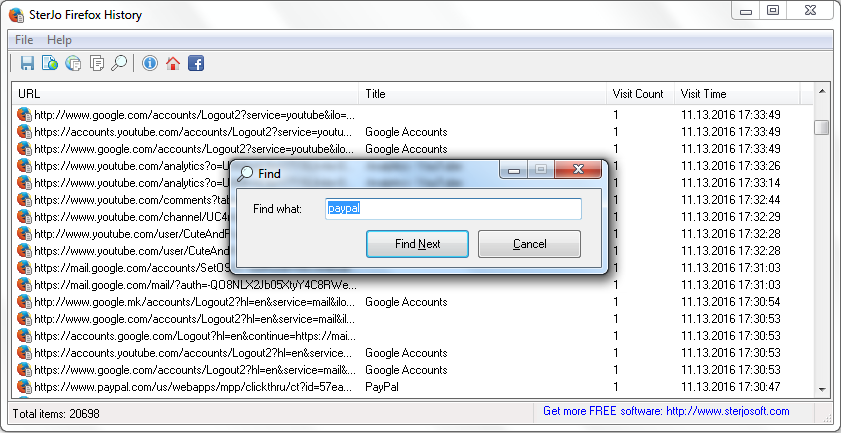
Firefox stores browsing history in an SQLite database called places.sqlite inside your Firefox profile folder. SterJo Firefox History reads this database, extracts all history entries and presents them in a fully searchable and exportable interface. The tool is completely read-only — it never modifies Firefox data.
Step-by-Step: View Your Firefox Browsing History
- Download SterJo Firefox History below.
- Run the application — it auto-detects your Firefox profile.
- Browse your complete history with URLs, titles and visit counts.
- Use the search box to find specific pages instantly.
- Export results to TXT, HTML or CSV as needed.
Key Features
- Displays URL, page title, visit count and last visit time for every entry
- Fast real-time search and filtering
- Sort by any column — URL, title, visit date or frequency
- Export to TXT, HTML or CSV formats
- Supports Firefox 32 and all newer versions
- Read-only — never modifies Firefox data or settings
- Portable version available — no installation required
- Compatible with Windows XP through Windows 11
Download SterJo Firefox History
📥 SterJo Firefox History v1.0 (1.2 MB)
Download Installer Portable Version✓ Free forever | ✓ Windows XP – 11 (32/64-bit) | ✓ No account required
Version History
Version 1.0: First public release. Supports Firefox 32 and all newer versions.
When Would You Use SterJo Firefox History?
- Find a forgotten page — Locate a website you visited weeks ago that you can't remember the name of.
- Export before reinstalling — Back up your complete Firefox history before formatting your PC or reinstalling Windows.
- Parental oversight — Review browsing history on a family computer running Firefox.
- Data analysis — Identify your most-visited websites or analyze time spent on different sites.
- IT auditing — Review browser history on managed devices for policy compliance.
SterJo Firefox History vs. Firefox's Built-In History
Firefox's built-in Library (Ctrl+H) shows history organized by date but limits how far back you can go, can't display visit counts and has no bulk export option. SterJo Firefox History exposes the complete history database, shows visit frequency, lets you sort any column, and exports everything to a file — making it far more useful for research, backup and analysis.
Also see: SterJo Chrome History Viewer | SterJo Firefox Passwords
When Firefox History Gets Deleted
Firefox history can be deleted in several ways: using the Clear History function (Ctrl+Shift+Del), setting Firefox to clear history on close, or using privacy mode (private browsing doesn't write to history at all). SterJo Firefox History shows whatever is currently in the database — it cannot recover entries that have been permanently cleared.
Frequently Asked Questions
Is SterJo Firefox History free?
Yes. SterJo Firefox History is completely free with no registration or payment required.
Can it recover deleted Firefox history?
No. The tool only reads history currently stored in the Firefox profile database. History that has been cleared or deleted cannot be recovered.
Which Firefox versions are supported?
Firefox 32 and all newer versions are supported, including the current release of Firefox on Windows 11.
Can I export Firefox history to Excel?
Yes. Use the CSV export option and open the file in Microsoft Excel, Google Sheets or any spreadsheet application.
Does it modify Firefox files or settings?
No. SterJo Firefox History is strictly read-only and does not alter any Firefox data, profile or settings.
Can I view history from a Firefox profile on another PC?
Yes. Firefox's places.sqlite is not encrypted with Windows DPAPI (unlike Chrome passwords), so it can be read on a different PC. Copy the profile folder and point the tool to the places.sqlite file.
Does it show private browsing history?
No. Firefox Private Browsing sessions are not written to places.sqlite by design. Only regular browsing history is visible.
Can I view history for multiple Firefox profiles?
Firefox stores a separate places.sqlite for each profile. The tool reads the default profile. Each profile's history is in a separate database at its own profile path.
📋 Popular Password Guides
- Wi-Fi How to Find Any Saved Wi-Fi Password
- Product Keys Backup Keys Before Reinstalling Windows
- Security Detect Unauthorized Network Access
- Chrome Recover Saved Chrome Passwords
- Windows Windows Credential Manager Explained
