SterJo FileZilla Decryptor — Recover FileZilla Passwords
SterJo FileZilla Decryptor instantly recovers FileZilla passwords saved by the FileZilla Client. The tool is lightweight, uses minimal system resources, and is straightforward to use — whether you prefer the installer or the portable version. With a single click it decodes stored FTP credentials so you can regain access to forgotten logins.
How Does SterJo FileZilla Decryptor Work?
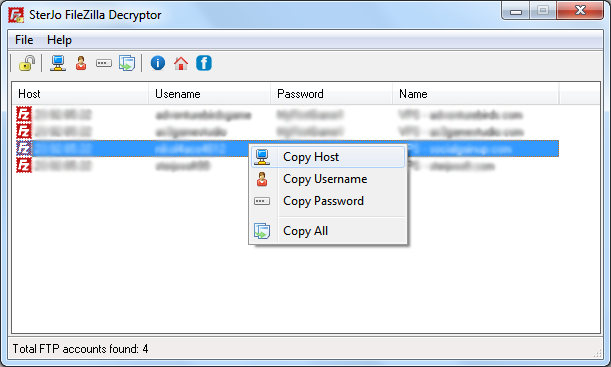
When you run SterJo FileZilla Decryptor it locates the FileZilla Client storage on your PC and decodes stored site credentials. Click the “Decrypt FileZilla Passwords” button and the application will list all recovered FTP logins and their corresponding passwords, ready to copy or export.
This utility is designed for desktop Windows environments and works with FileZilla Client installations that use a decryptable storage format. For details on compatibility, see the FAQ below.
Step-by-Step: Recover FileZilla Saved Passwords
- Download SterJo FileZilla Decryptor using the link below.
- Run the application — it automatically locates the FileZilla profile folder.
- All found FTP sites are displayed with hostname, port, protocol, username and password.
- Copy any credential to clipboard for immediate use.
Download & install
📥 Download SterJo Browser Passwords v1.3 (1.5 MB)
Download Installer Portable Version✓ Works on Windows 11, 10, 8, 7, Vista, XP (32/64-bit)
The application is available as both an installer and a portable executable. It is ideal when you need to quickly recover forgotten FileZilla passwords without installing extra software.
Note: FileZilla changed how it stores passwords starting with certain versions. Compatibility depends on the FileZilla Client version and its storage method. If passwords are stored using an encrypted format incompatible with this tool, SterJo FileZilla Decryptor may not be able to recover them. If you are unsure which FileZilla version you have, consult the FileZilla Client release notes or our FAQ below.
Version History
Version 1.3: Bug fixes and stability improvements.
Version 1.2: Minor changes.
Version 1.1: Added multi-language support and option to recover portable FileZilla passwords.
Version 1.0: First public release.
When You Need FileZilla Password Recovery
- Migrating to a new PC — Before decommissioning an old computer, recover all saved FTP site credentials from FileZilla to set them up on the new machine.
- Reinstalling Windows — Back up your FTP credentials before a clean Windows install so you don't have to re-enter dozens of server passwords from memory.
- Developer handover — A developer is leaving and their FileZilla profile contains FTP credentials for client servers that need to be documented.
- Forgotten FTP password — You set up an FTP connection in FileZilla months ago and the auto-login stopped working; you need to retrieve the stored password.
Important Security Note About FileZilla
FileZilla stores passwords in these XML files using only Base64 encoding — not true encryption. Base64 is a reversible encoding format, not a security measure. This means anyone with access to your Windows user profile folder can decode your FileZilla credentials without needing a key or password.
This is a known and long-standing security concern with FileZilla's credential storage. If you store sensitive FTP credentials in FileZilla on a shared or multi-user Windows machine, be aware that those credentials are accessible to anyone with read access to your AppData folder. The SterJo decryptor makes this process convenient, but the underlying vulnerability is in FileZilla's design.
Recommendation: For sensitive FTP credentials, consider using a dedicated password manager and entering credentials manually when needed, rather than relying on FileZilla's built-in password storage.
Frequently Asked Questions
Can SterJo FileZilla Decryptor recover passwords from modern FileZilla versions?
Compatibility depends on how the FileZilla Client stores passwords. FileZilla changed its storage format in some releases; if the client uses an encrypted storage format incompatible with this tool, it may not be able to recover those passwords. Check your FileZilla version and see our compatibility notes.
Is SterJo FileZilla Decryptor free?
Yes. The application is free to use. A portable version is available if you prefer not to install the software.
Which operating systems are supported?
SterJo FileZilla Decryptor supports Windows desktop platforms. It is tested on Windows XP and newer releases — compatibility may vary depending on the FileZilla Client version.
Does the tool transmit my recovered passwords anywhere?
No. The utility works locally on your machine and does not send recovered credentials over the internet.
How do I export recovered credentials?
After recovery you can copy passwords manually or use the program's export option (if available) to save results locally. Always handle exported files securely.
Can SterJo FileZilla Decryptor recover all FileZilla passwords?
It recovers all passwords stored in FileZilla's sitemanager.xml file. If a site was never saved and the credential is not in that file, it cannot be recovered.
Does FileZilla actually encrypt its saved passwords?
No. FileZilla uses Base64 encoding, not encryption. The decryptor simply reverses this encoding to display the original password in plain text.
What FTP protocols are covered?
The tool recovers credentials for FTP, SFTP (SSH File Transfer Protocol) and FTPS (FTP over TLS) connections stored in FileZilla's site files.
Where is FileZilla's sitemanager.xml on Windows?
It is located at %AppData%\FileZilla\sitemanager.xml. Type this path directly into Windows Explorer's address bar to navigate there. The tool locates this automatically.
Does it work with all FileZilla versions?
The XML storage format has been consistent across FileZilla versions. The tool should work with all common FileZilla releases on Windows.
Is the tool safe to use?
Yes. It reads local FileZilla configuration files only. No data is transmitted externally. Always download from the official SterJo website.
Is it free?
Yes. SterJo FileZilla Decryptor is completely free to download and use.
Safe & Legal Use
This tool is intended for recovering your own saved credentials from your own device and accounts. Terms of Use | Privacy Policy
📋 Popular Password Guides
- Wi-Fi How to Find Any Saved Wi-Fi Password
- Product Keys Backup Keys Before Reinstalling Windows
- Security Detect Unauthorized Network Access
- Chrome Recover Saved Chrome Passwords
- Windows Windows Credential Manager Explained
