SterJo Twitter Password Finder (Free Twitter Password Recovery Tool)
Recover forgotten Twitter login credentials that were saved by your browser. SterJo Twitter Password Finder scans local browser profiles and displays stored Twitter usernames and passwords from Chrome, Firefox, Edge, Opera, Vivaldi, Brave and similar browsers — quickly and offline.
How SterJo Twitter Password Finder Works?
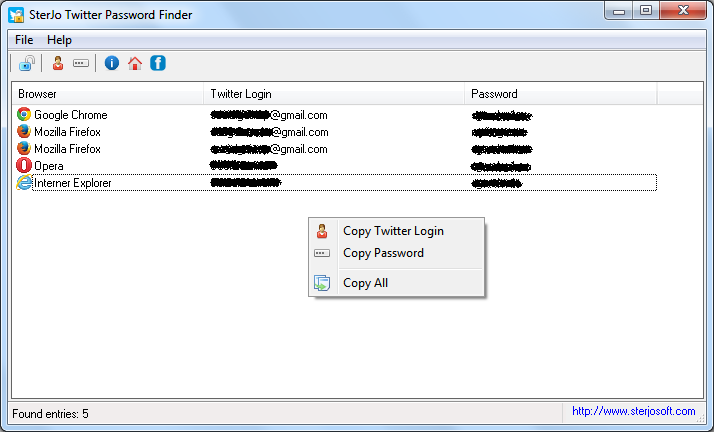
The program automatically scans installed browser profiles on the current Windows user account, finds saved credentials for twitter.com and displays them in a readable format. The interface is simple — launch the tool, press the recover button, and copy the credentials as needed.
Step-by-Step: Recover Your Saved Twitter/X Password
- Download SterJo Twitter Password Finder using the button above.
- Run the application — portable version requires no installation.
- The tool scans all browser profiles on your PC automatically.
- Any saved Twitter or X credentials appear instantly with the associated username and password.
- Copy the password to your clipboard with one click.
Download & Install
📥 Download SterJo Twitter Password Finder v2.0 (2.1 MB)
Download Installer Portable Version✓ Works on Windows 11, 10, 8, 7, Vista, XP (32/64-bit)
Important: This is not a Twitter password hacker or cracker. It only reveals login data already stored in your browser profile. Use the tool only for accounts you own or administer.
System Requirements
Works on Windows XP, Vista, 7, 8, 10 and Windows 11 — both 32-bit and 64-bit editions (tool itself is 32-bit but supports many 64-bit browsers via Chromium support).
Supported Browsers
- Google Chrome
- Mozilla Firefox (32-bit only; see note below)
- Microsoft Edge (Chromium-based)
- Microsoft Edge (Legacy)
- Internet Explorer
- Opera
- Vivaldi
- Brave Browser
- Epic Privacy Browser
- Torch Browser
Version History
2.0: UI updates and removed legacy dependencies.
1.6: Added support for Microsoft Edge (Chromium).
1.5: Updated decryption for Chrome, Opera, Vivaldi, Brave.
1.4: Added Brave, Epic and Torch.
1.3: Bug fixes.
1.2: Vivaldi & Yandex support.
1.1: Multi-language support.
1.0: Initial release.
Why Twitter/X Passwords Get Forgotten
Twitter encourages staying logged in persistently — many users go years without manually entering their password. When they switch devices, reinstall Windows, or open a different browser, they realize the autofilled password is gone. Because Twitter does not provide an easy way to view your current password (only to reset it), the saved browser copy is often the only recoverable version without a full password reset and potential loss of account access during 2FA verification.
After Recovering Your X/Twitter Password
- Update it if it's short or old — use a strong, unique password with 16+ characters.
- Enable two-factor authentication on X: Settings → Security and account access → Security → Two-factor authentication.
- Check connected apps — Review what third-party apps have access to your account and revoke any you don't recognize.
- Review active sessions — Under Security settings, check logged-in sessions and remove unfamiliar ones.
Frequently Asked Questions
Is this tool a Twitter password hacker?
No. It only displays credentials already saved locally in your browser profile for accounts you own.
Will the tool upload my passwords anywhere?
No. The software works entirely offline and does not transmit credentials to external servers.
Can I recover passwords from another Windows user?
No. It can only access the browser profiles for the currently logged-in Windows user (unless you have permissions to access other user data).
Does this tool work after Twitter's rebrand to X?
Yes. The tool looks for saved credentials under both twitter.com and x.com, so it covers passwords saved before and after the rebrand.
What if the tool shows nothing?
Your browser either never saved your Twitter password, the saved data was cleared, or you used a browser or profile not yet supported. Check if a different browser on your PC might have the saved password.
Why is my Firefox password blank?
Firefox 64-bit uses a different encryption library. SterJo's Firefox support is 32-bit, so passwords saved in Firefox 64-bit may not appear. The linked guide at the top explains how to address this.
Does the tool transmit any data?
No. The tool runs entirely offline and no data is transmitted anywhere. All processing and display happens locally on your PC.
Is it legal to use?
Yes, for recovering your own saved passwords from your own device. Using it to access someone else's account is illegal.
Does it work on Windows 11?
Yes. Supported on Windows XP through Windows 11, both 32-bit and 64-bit.
Safe & Legal Use
This tool is intended only for recovering your own saved credentials from your own device. Terms of Use | Privacy Policy
📋 Popular Password Guides
- Wi-Fi How to Find Any Saved Wi-Fi Password
- Product Keys Backup Keys Before Reinstalling Windows
- Security Detect Unauthorized Network Access
- Chrome Recover Saved Chrome Passwords
- Windows Windows Credential Manager Explained
