SterJo Facebook Blocker – Block Facebook on All Browsers with One Click
SterJo Facebook Blocker is a free, lightweight Windows tool that blocks access to Facebook across all browsers installed on the system with a single click. It is ideal for parents wanting to restrict children's social media use, schools and libraries managing student productivity, and businesses limiting workplace distractions.
How SterJo Facebook Blocker Works
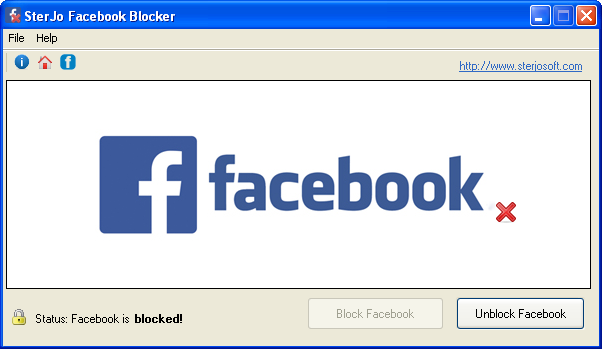
The blocker works by modifying system-level network access rules that prevent browsers from resolving and loading the Facebook domain. Once enabled, any attempt to open Facebook — whether typed directly, clicked in a bookmark, or from an external link — is blocked automatically. Because it operates at the OS level, the block applies to every browser on the computer simultaneously, including Chrome, Firefox, Edge and others.
Step-by-Step: Block Facebook on Your Computer
- Download SterJo Facebook Blocker below.
- Run the application as Administrator.
- Click Block to immediately prevent all Facebook access.
- Click Unblock at any time to restore access.
Key Features
- Blocks Facebook access on all browsers with a single click
- Works with Chrome, Firefox, Edge, IE and any Windows browser
- System-level blocking — no browser extension needed
- Toggle on/off instantly for flexible control
- Ideal for parental controls, schools and workplace productivity
- Portable — no installation required
- Free to download and use
- Compatible with Windows XP through Windows 11
Download SterJo Facebook Blocker
📥 SterJo Facebook Blocker v1.1 (1.4 MB)
Download Installer Portable Version✓ Free forever | ✓ Windows XP – 11 (32/64-bit) | ✓ No account required
Common Use Cases
- Parental control — Block children from accessing Facebook on the family PC during school hours or entirely.
- School and library management — Prevent students from using Facebook on shared computers during class or study time.
- Workplace productivity — Restrict Facebook access on office PCs to reduce social media distractions during work hours.
- Personal focus — Block Facebook for yourself during work or study sessions to stay focused.
Facebook Blocker vs. Browser Extensions
Browser-based blockers only work within a single browser and can be easily bypassed by switching to a different browser. SterJo Facebook Blocker blocks Facebook at the operating system level, which means the block applies to every browser on the machine simultaneously — Chrome, Firefox, Edge, Opera and any other. It is more thorough and harder to circumvent.
How System-Level Facebook Blocking Works
SterJo Facebook Blocker operates at the Windows system level by blocking connections to Facebook's domains before they reach your browser. When the blocker is enabled, DNS requests for facebook.com (and related domains) are intercepted and refused, preventing any browser, app, or background process on the PC from connecting to Facebook.
Because this works at the system level — not inside a specific browser — it blocks Facebook in Chrome, Firefox, Edge, Opera, and every other application on the same Windows machine. A single toggle covers the entire system without requiring any browser extension or per-app configuration.
What Does It Block?
The blocker targets the main Facebook domains, which includes:
- facebook.com — The main Facebook website
- www.facebook.com — www subdomain
- m.facebook.com — Mobile version of Facebook
- Facebook's CDN and static asset domains — Used for loading images and scripts
Note: Instagram (instagram.com) and WhatsApp (web.whatsapp.com) are separate domains — this tool blocks Facebook specifically. Use SterJo YouTube Ad Blocker if you also need to block YouTube.
How to Re-Enable Facebook Access
When you want to allow Facebook access again, simply launch SterJo Facebook Blocker and click the Disable/Unblock button. The system-level block is immediately removed and all browsers can access Facebook again. The toggle is instant and requires no system restart.
Frequently Asked Questions
Does SterJo Facebook Blocker work on all browsers?
Yes. Because the tool blocks Facebook at the Windows system level (not within a specific browser), it prevents Facebook access on every browser installed on the computer — Chrome, Firefox, Edge, Opera, IE and others.
Can it be used for parental controls?
Yes. Parents can use it to restrict children's access to Facebook entirely or temporarily block it during homework hours. For stronger parental controls with scheduling, consider dedicated parental control software in addition.
Can the block be reversed?
Yes. Simply run the tool and click Unblock to restore full Facebook access at any time.
Is SterJo Facebook Blocker free?
Yes. Completely free to download and use for personal, educational and business purposes.
Which Windows versions are supported?
Windows XP, Vista, 7, 8, 10 and 11 in both 32-bit and 64-bit editions.
Does it block Facebook Messenger?
Facebook Messenger on desktop runs through facebook.com and messenger.com. Blocking facebook.com will prevent the main Messenger web interface from loading. The dedicated Messenger desktop app may also be affected depending on which domains it uses.
Does it block Instagram (also owned by Meta)?
No. Instagram runs on instagram.com, which is a separate domain. SterJo Facebook Blocker targets Facebook's domains specifically. Instagram is not affected.
Can someone bypass the block using a VPN?
A VPN routes traffic through a different server, which could bypass system-level domain blocking. For strict blocking scenarios (parental controls, workplace policy), additional controls may be needed alongside this tool.
Does it block Facebook login buttons on other websites?
Yes. "Sign in with Facebook" buttons on third-party websites load content from facebook.com. With blocking enabled, these buttons may fail to load or function.
Will it affect other sites that use Facebook widgets?
Some websites embed Facebook Like buttons, comment boxes or social sharing widgets that load content from facebook.com. These elements will fail to load when the block is active, though the rest of those websites will continue to work normally.
Is administrator access required?
Yes. System-level network blocking requires administrator privileges to modify the relevant Windows settings.
Is the tool free?
Yes. SterJo Facebook Blocker is completely free to download and use.
📋 Popular Password Guides
- Wi-Fi How to Find Any Saved Wi-Fi Password
- Product Keys Backup Keys Before Reinstalling Windows
- Security Detect Unauthorized Network Access
- Chrome Recover Saved Chrome Passwords
- Windows Windows Credential Manager Explained
