SterJo Facebook Password Finder (Free Facebook Password Recovery Tool)
Recover forgotten Facebook login details saved by your web browser. SterJo Facebook Password Finder instantly extracts stored Facebook usernames and passwords from Chrome, Firefox, Edge, Opera, Brave, Vivaldi and other supported browsers. Ideal if you’ve forgotten your Facebook password and need quick access to your account without resetting it.
How Does SterJo Facebook Password Finder Work?
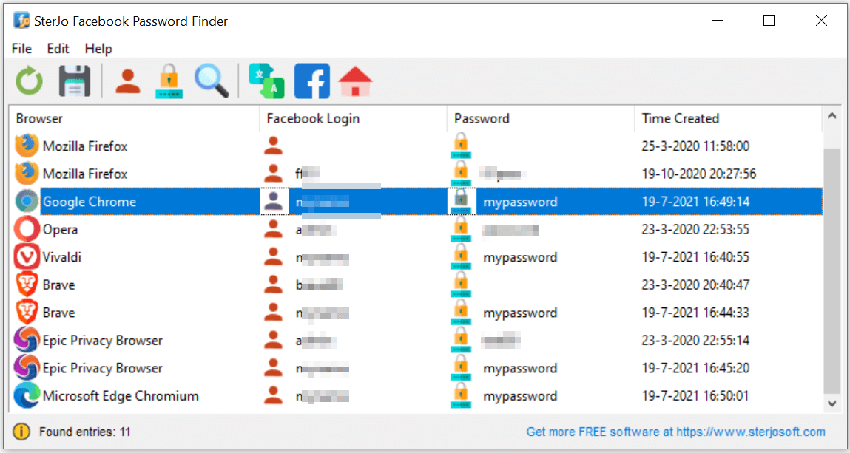
The tool scans your local browser profiles and decrypts stored login data saved by browsers that you previously used to sign into Facebook. No advanced settings or technical knowledge are needed — simply launch the tool and view your saved Facebook login credentials instantly.
Step-by-Step: Recover Your Saved Facebook Password
- Download SterJo Facebook Password Finder using the link above.
- Run the application — no installation is needed for the portable version.
- The tool automatically scans all browser profiles installed on your PC.
- Any Facebook credentials found are displayed instantly — website, username and password.
- Copy your recovered password to the clipboard with one click.
The scan is entirely local — no data is transmitted to any server. All processing happens on your own PC.
Download & Install
📥 Download SterJo Facebook Password Finder v2.0 (2.2 MB)
Download Installer Portable Version✓ Works on Windows 11, 10, 8, 7, Vista, XP (32/64-bit)
NOTE: This tool is NOT a Facebook hacker or password cracker. It only displays Facebook login information already stored in your own browser. Use it exclusively for accounts you own or manage.
System Requirements
SterJo Facebook Password Finder works on Windows XP, Vista, 7, 8, 10 and Windows 11 (both 32-bit and 64-bit versions). The tool runs offline and does not upload decrypted credentials to any server.
Supported Browsers
- Google Chrome
- Mozilla Firefox (32-bit only; see note below)
- Microsoft Edge (Chromium-based)
- Microsoft Edge (Legacy)
- Internet Explorer
- Opera
- Vivaldi
- Brave Browser
- Epic Privacy Browser
- Torch Browser
See: How to recover 64-bit Firefox passwords.
Version History
2.0: UI updates, removed legacy dependencies (.OCX, .DLL)
1.6: Support for new Microsoft Edge (Chromium)
1.5: Updated decryption for Chrome, Opera, Vivaldi, Brave
1.4: Added Brave, Epic, Torch browsers
1.3: Bug fixes
1.2: Added Vivaldi & Yandex support
1.1: Multi-language support
1.0: Initial release
Why Your Facebook Password May Be Stored in Your Browser
Every major browser offers to save your login details when you sign in to a website. If you clicked "Save password" or "Remember me" at any point when logging into Facebook, your browser encrypted and stored that username and password locally on your Windows PC. SterJo Facebook Password Finder decrypts that stored data and shows it to you in plain text.
This is completely different from hacking or cracking. The password is already on your machine — the tool simply gives you a way to see it again when your browser's autofill won't show it directly.
After Recovering Your Facebook Password
Once you have your password back, take a moment to improve your Facebook account security:
- Update your password if it is weak, old, or reused across other sites. Use a password manager or SterJo Strong Password Generator to create a strong replacement.
- Enable two-factor authentication — Go to Facebook Settings → Security and Login → Two-Factor Authentication. This adds a second layer of protection even if your password is ever compromised.
- Review active sessions — In the same Security settings page, check "Where You're Logged In" and remove any sessions from devices you don't recognize.
- Check connected apps — Under Settings → Apps and Websites, review which third-party apps have access to your account and remove any you no longer use.
Facebook Account Security Tips
For a Facebook account used for personal or business purposes, these habits significantly reduce the risk of unauthorized access:
- Use a unique password for Facebook — never the same one used for email or other services.
- Set up trusted contacts so you can recover your account through friends if needed.
- Avoid logging in on public or shared computers. If you must, always log out and clear saved passwords afterward.
- Be cautious of phishing pages that mimic Facebook's login — always check the URL before entering credentials.
- Turn on alerts for unrecognized logins to get notified immediately if someone logs in from an unfamiliar device.
Frequently Asked Questions
Does this tool hack Facebook passwords?
No. It only reads your own Facebook login data already saved by your browser.
Can it recover Facebook passwords from Chrome, Edge, or Opera?
Yes, all Chromium-based browsers are supported.
Does it work if I deleted my browser profile?
No. If the profile was deleted, the stored password is gone.
Does the tool collect or upload any data?
No. It works offline and never sends information to external servers.
Can it recover Facebook passwords from another user account?
No. It can only access the currently logged-in Windows user's browser profile.
Can this tool hack or crack Facebook passwords?
No. It only displays login credentials already saved in your own browser on your own PC. It cannot access any external account, crack passwords, or bypass Facebook's security systems.
What if the tool shows nothing?
If no credentials appear, your browser either never saved your Facebook password, you cleared saved passwords at some point, or you use a browser profile that is not yet supported by the current version of the tool.
Does it work if I have multiple browser profiles?
The tool scans the default and active browser profiles. If you use a non-default profile, results may vary depending on which browser and version you are using.
Why does Firefox show blank results?
Firefox moved most users to 64-bit builds automatically. SterJo's decryption module for Firefox is 32-bit, so saved passwords in Firefox 64-bit may not be visible. See the note above for a workaround guide.
Will my antivirus flag this tool?
Some security software flags password recovery tools as potentially unwanted. This is a false positive — the tool only reads your own locally stored browser data. Always download from the official SterJo website to ensure the file is genuine.
Can I recover Facebook passwords from a different Windows user account?
Browser passwords are stored under each Windows user account separately and encrypted with that account's key. You must run the tool under the same user account whose browser saved the Facebook password.
Is this tool legal to use?
Yes, when used to recover your own saved passwords from your own device. Using it to access another person's account without permission is illegal and violates Facebook's terms of service.
Does the tool store or transmit my passwords anywhere?
No. SterJo Facebook Password Finder operates completely offline. No data ever leaves your computer.
Does it work on Windows 11?
Yes. The tool is compatible with Windows XP through Windows 11, including both 32-bit and 64-bit editions.
What should I do if I've also forgotten my Facebook email address?
The tool displays the username or email address associated with the saved Facebook password alongside the password itself, so you'll recover both pieces of information at once.
Safe & Legal Use
This tool is intended only for recovering your own saved credentials from your own device. Do not use it to access accounts you do not own or are not authorized to access. Terms of Use | Privacy Policy
📋 Popular Password Guides
- Wi-Fi How to Find Any Saved Wi-Fi Password
- Product Keys Backup Keys Before Reinstalling Windows
- Security Detect Unauthorized Network Access
- Chrome Recover Saved Chrome Passwords
- Windows Windows Credential Manager Explained
