SterJo Fast IP Scanner – Free IP Range Scanner for Windows
SterJo Fast IP Scanner is a fast, free and portable Windows tool that scans any IP address range and instantly detects all active devices on your network. For each responding device it shows the IP address, hostname and network status — giving you a complete picture of your local network in seconds.
The tool is completely free and portable. No installation or configuration is required.
How SterJo Fast IP Scanner Works
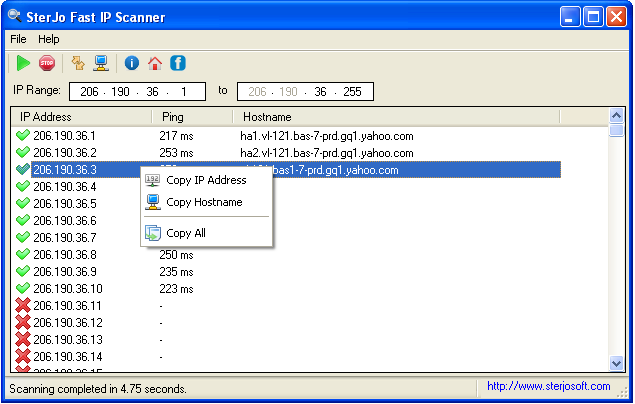
SterJo Fast IP Scanner sends ICMP ping requests to every address in the specified IP range. Active devices that respond are listed immediately along with their hostname (resolved via reverse DNS) and response time. The scan is multi-threaded, allowing it to check over 1,000 IP addresses in under 30 seconds on a standard home or office network.
Step-by-Step: Scan Your Network with IP Scanner
- Download SterJo Fast IP Scanner below.
- Run the tool — enter your IP range (e.g. 192.168.1.1–192.168.1.254).
- Click Scan to start the sweep of your network.
- View all responding devices with their IP address, hostname and status.
- Export or note the results for network documentation.
Key Features
- Scans any custom IP address range in seconds
- Multi-threaded scanning — checks 1,000+ IPs in under 30 seconds
- Displays IP address, hostname and network status per device
- Works on home, office and enterprise local networks
- Portable — runs without installation from any folder or USB drive
- Compatible with Windows XP through Windows 11
- Completely free with no limitations
Download SterJo Fast IP Scanner
📥 SterJo Fast IP Scanner v1.1 (1.7 MB)
Download Installer Portable Version✓ Free forever | ✓ Windows XP – 11 (32/64-bit) | ✓ No account required
Version History
Version 1.1: Improved speed and multi-thread performance.
Version 1.0: First public release.
Common Use Cases
- Network auditing — Find all devices currently active on your office or home network.
- Detecting unknown devices — Identify rogue or unauthorized devices connected to your LAN.
- IP conflict resolution — Check which IPs are already in use before assigning a static IP.
- Server inventory — Quickly map active servers and workstations across a subnet.
- IoT device discovery — Find smart home devices (cameras, routers, printers) on your network.
For monitoring suspicious connections, also try SterJo NetStalker which monitors real-time network activity from your Windows PC. For detecting all devices on your wireless network, see SterJo Wireless Network Scanner.
What Is IP Scanning and Why It Matters
An IP scanner sends network pings or ARP requests to all addresses within a specified IP range and records which addresses respond. Each device connected to a network — computer, phone, printer, smart TV, router, NAS drive, security camera — occupies an IP address. Scanning your local network reveals a complete list of active devices with their IP addresses, and often their MAC addresses and hostnames too.
This information is essential for network troubleshooting, security audits, and general network management. Knowing exactly which devices are on your network helps you spot unauthorized connections, find devices you need to configure, and understand your network's layout.
Frequently Asked Questions
How fast is SterJo Fast IP Scanner?
The tool can scan over 1,000 IP addresses in less than 30 seconds on a typical local network, thanks to its multi-threaded ping engine. Actual speed depends on network size and device response times.
Does it detect devices that don't respond to ping?
Devices with ICMP blocked by a firewall will not appear in the scan results. Most standard home and office devices respond to ping by default, but servers with strict firewalls or stealth-mode configurations may not.
Can I use it without installation?
Yes. A portable version is available that runs directly from any folder or USB drive without requiring installation.
Which Windows versions are supported?
Windows XP, Vista, 7, 8, 10 and 11 in both 32-bit and 64-bit editions.
What IP range should I scan for my home network?
Most home routers use 192.168.1.x or 192.168.0.x. Find your router's IP address by running ipconfig in Command Prompt and noting the Default Gateway — your devices are on the same subnet.
Can it scan remote networks or the internet?
The tool is designed for local network scanning. Scanning internet IP ranges would be extremely slow, ineffective, and potentially violates terms of service for internet providers.
How do I find my router's admin page?
The scan will show your router as one of the active devices. Its IP address (often ending in .1) is the address you type into a browser to reach the admin panel.
What is the difference between IP Scanner and Network Scanner?
SterJo Network Scanner provides a broader view of devices and may include additional device details. IP Scanner focuses on rapid IP range scanning with response times and MAC addresses.
Does running an IP scan notify device owners?
No. An IP ping scan is passive from the target's perspective — devices respond to standard network pings which happen on any network constantly. No notification is sent to scanned devices.
Is the tool free?
Yes. SterJo IP Scanner is completely free to download and use.
📋 Popular Password Guides
- Wi-Fi How to Find Any Saved Wi-Fi Password
- Product Keys Backup Keys Before Reinstalling Windows
- Security Detect Unauthorized Network Access
- Chrome Recover Saved Chrome Passwords
- Windows Windows Credential Manager Explained
