SterJo Wireless Network Scanner – Detect All Devices Connected to Your WiFi
SterJo Wireless Network Scanner is a free, lightweight Windows tool that instantly shows every device connected to your wireless network. Whether it's a PC, smartphone, smart TV, tablet or an unknown intruder, the scanner lists all active devices with their IP address, MAC address, hostname and router details — giving you full visibility of who is on your network.
The tool is free, portable and works 100% on your local network without any cloud services.
How SterJo Wireless Network Scanner Works
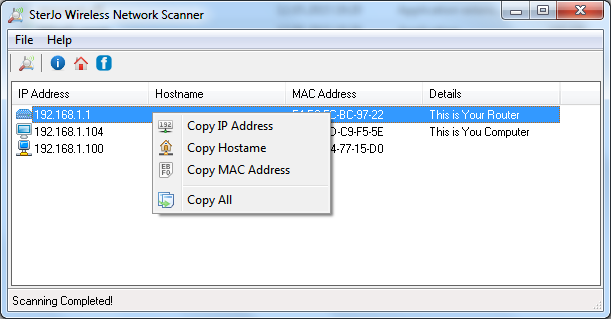
The scanner analyzes your local wireless network by broadcasting ARP requests across the subnet. Every device that responds — including those that block ICMP ping — is listed immediately. This approach is more reliable than ping-based scanners and catches more devices, especially smartphones and IoT hardware that may not respond to traditional pings.
Step-by-Step: Find All Devices on Your WiFi
- Download SterJo Wireless Network Scanner below.
- Connect your computer to the WiFi network you want to scan.
- Run the tool — it auto-detects your wireless adapter.
- Click Scan to start device discovery.
- Review every device found — compare against your known devices to spot intruders.
What Information Is Shown for Each Device
- IP Address — the network address assigned to the device
- MAC Address — the hardware identifier (useful for identifying device manufacturer)
- Hostname — the device name if it broadcasts one on the network
- Router information — gateway and local network details
- Your own computer details for reference
Download SterJo Wireless Network Scanner
📥 SterJo Wireless Network Scanner v1.2 (1.3 MB)
Download Installer Portable Version✓ Free forever | ✓ Windows XP – 11 (32/64-bit) | ✓ No account required
Version History
Version 1.2: Improved ARP-based device detection for better coverage of mobile devices.
Version 1.1: Added MAC address vendor lookup.
Version 1.0: First public release.
Practical Uses for Network Scanning
Knowing what's connected to your network is useful in more situations than most people expect:
- Find your printer's IP address — When setting up network printing, you need the printer's IP address. A network scan finds it instantly without digging through router admin panels.
- Locate a NAS drive or network storage — Home servers and NAS devices don't always announce themselves. A scan reveals their IP so you can configure or connect to them.
- Set up smart home devices — New smart lights, thermostats, cameras and similar devices need to be identified on the network before configuration.
- Troubleshoot connectivity issues — Confirm whether a device is actually on the network or just appears offline to a specific computer.
- Security audit — Identify devices you don't recognize and investigate whether they should be connected.
- IP conflict detection — Spot when two devices have been assigned the same IP address, which causes intermittent connectivity problems.
Is Someone Using Your WiFi Without Permission?
If your internet feels slow or you see unexpected data usage, an unauthorized device may be connected to your network. SterJo Wireless Network Scanner helps you identify any such device in seconds. Once found, you can block it from your router by MAC address and change your WiFi password to prevent re-connection. For recovering your current WiFi password, see SterJo Wireless Passwords.
For monitoring ongoing network traffic from your own PC, also try SterJo NetStalker.
How to Find Unauthorized Devices
Run SterJo Network Scanner and review every device in the results. For any device you don't immediately recognize, look up its MAC address prefix (OUI) on a site like macvendors.com to identify the manufacturer. This often reveals whether an unknown device is a phone, laptop, IoT device or network hardware you legitimately own but forgot about.
If you find a device you genuinely don't recognize and can't account for, change your WiFi password immediately using SterJo Wireless Key Generator to generate a strong new one.
Frequently Asked Questions
Can SterJo Wireless Network Scanner detect unauthorized devices?
Yes. The scanner lists every device currently connected to your wireless network. Compare the list against your known devices — any unfamiliar MAC address or hostname could indicate an unauthorized connection.
Does it scan both 2.4 GHz and 5 GHz networks?
The scanner detects devices on the wireless band your Windows computer is currently connected to. If your adapter supports both bands and is connected to a dual-band network, devices on both bands that are on the same subnet will appear.
Does it need installation?
No. A portable version is available so you can run the scanner directly without installing anything.
Can it find smart home and IoT devices?
Yes. The ARP-based scanning method detects smartphones, tablets, smart TVs, security cameras, smart speakers and other IoT devices that may not respond to regular ping.
Which Windows versions are supported?
Windows XP, Vista, 7, 8, 10 and 11 in both 32-bit and 64-bit editions.
Can it scan networks outside my local network?
The tool is designed for local area network (LAN) discovery — the devices connected to your home or office router. It is not intended for scanning internet-facing IP ranges.
Does the scan affect my network performance?
A local network scan generates a small amount of traffic across your subnet. On most modern home and office networks this has no noticeable impact on performance.
Is it legal to scan my own network?
Yes. Scanning your own home or business network is legal and a normal network management practice. Do not scan networks you don't own or manage.
Is the tool free?
Yes. SterJo Network Scanner is completely free to download and use.
📋 Popular Password Guides
- Wi-Fi How to Find Any Saved Wi-Fi Password
- Product Keys Backup Keys Before Reinstalling Windows
- Security Detect Unauthorized Network Access
- Chrome Recover Saved Chrome Passwords
- Windows Windows Credential Manager Explained
