SterJo Password Unmask – Instantly Reveal Hidden Passwords
SterJo Password Unmask is a lightweight tool designed to reveal hidden passwords behind asterisks (*****) inside most Windows application password text boxes.
Many programs such as CuteFTP, Microsoft Outlook, email clients, and various login dialogs store passwords but mask them for security. When those passwords are forgotten, there is often no built-in way to view them again. SterJo Password Unmask solves this problem by instantly converting masked asterisks into readable characters, giving you quick access to your saved credentials.
How Does SterJo Password Unmask Work?
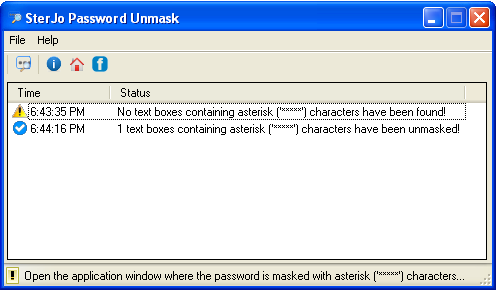
Open the application and navigate to any Windows dialog where the password field is masked with asterisks. By clicking the "Unmask" button, the tool immediately reveals the hidden characters so you can copy and reuse your password when needed.
You'll never lose access to passwords saved in Windows applications again — it’s fast, simple, and requires no complex setup.
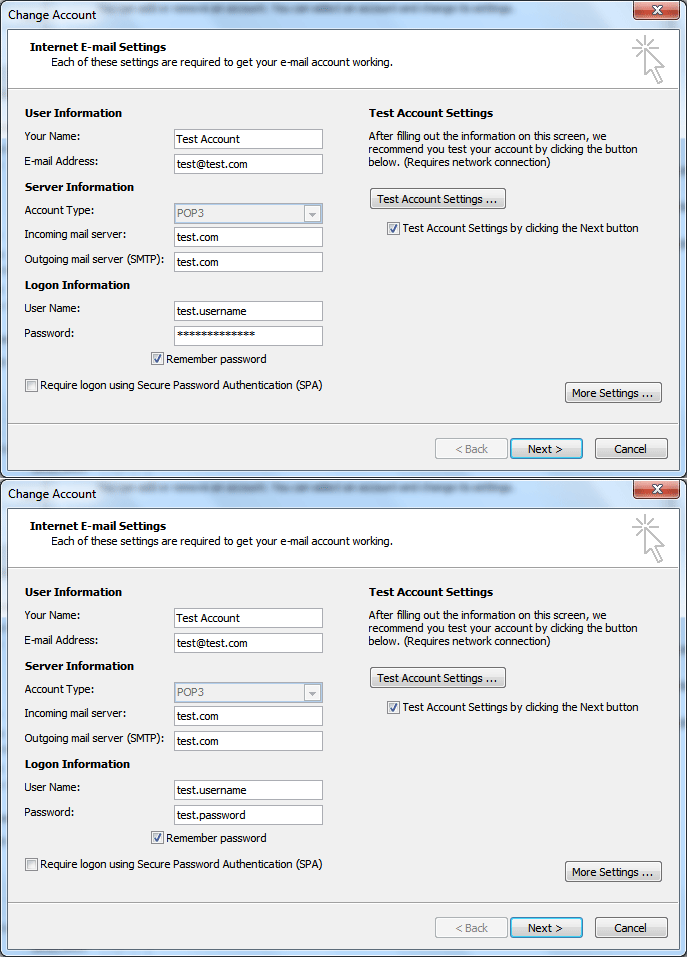
The program supports standard password text boxes in Windows desktop applications. Note that browsers such as Chrome, Firefox, and Edge use protected controls, so their login fields cannot be unmasked using this method.
Download & Install
📥 Download SterJo Passwords Unmask v1.2 (1.4 MB)
Download Installer Portable Version✓ Works on Windows 11, 10, 8, 7, Vista, XP (32/64-bit)
Version History
Version 1.2: Invokes elevated mode to unmask passwords on latest Windows systems.
Version 1.1: Added multi-language support.
Version 1.0: First public release.
When You Need SterJo Password Unmask
This tool is most useful in specific scenarios:
- FTP clients — Applications like CuteFTP, FileZilla, WinSCP and similar tools show the saved server password as asterisks in their connection settings. Password Unmask reveals it instantly.
- Email clients — Microsoft Outlook, Thunderbird and other email clients show account passwords as asterisks in their account settings dialogs.
- VPN clients — Many VPN applications store and display passwords masked in their configuration screens.
- Legacy business software — Older ERP systems, database clients, and enterprise applications often use standard Windows password controls and work well with this tool.
- Windows dialogs — Some Windows system dialogs that require entering a password may also be compatible.
Limitations
It is important to understand what this tool cannot do:
- Browser password fields — Chrome, Firefox, Edge and other modern browsers use protected rendering that bypasses standard Windows password controls. Their login fields cannot be unmasked with this method. Use the dedicated browser password recovery tools instead (Chrome Passwords, Firefox Passwords).
- UWP / Microsoft Store apps — Newer Windows 10/11 apps built on the Universal Windows Platform use different UI frameworks that may not respond to standard Windows messages.
- Web-based interfaces — Any application that displays a web page inside a browser engine (Electron apps, web views) will be similarly protected.
- Encrypted vault passwords — Passwords that are not currently loaded into a visible field (stored in an encrypted database) cannot be revealed by this method.
Frequently Asked Questions
What is SterJo Password Unmask used for?
SterJo Password Unmask is a Windows utility that reveals hidden or masked passwords displayed as asterisks (****) in password input fields.
How does SterJo Password Unmask work?
The tool scans active windows and extracts passwords from masked input fields, allowing you to view passwords that are already present on your screen.
Does this tool recover or crack passwords?
No. SterJo Password Unmask does not crack, decrypt, or guess passwords. It only reveals passwords that are already filled into password fields.
Can SterJo Password Unmask reveal browser passwords?
No. Browsers like Chrome, Firefox, and Edge use protected password fields that cannot be unmasked with standard Windows methods.
Can antivirus software flag Password Unmask as malware?
Some antivirus programs may report false positives because the tool accesses password fields. Downloading from the official SterJo website ensures safety.
Is SterJo Password Unmask portable?
Yes. The tool is fully portable and does not require installation. You can run it directly from a USB flash drive.
Why doesn't SterJo Password Unmask detect any passwords?
This may occur if no masked password fields are currently visible or the application uses custom encryption methods.
Which applications are supported?
The program works with most Windows applications that use standard password text boxes, including FTP clients, mail clients, and various login dialogs.
Is SterJo Password Unmask free to use?
Yes. The tool is completely free, lightweight, and requires no installation when using the portable version.
Is it safe to use?
Yes. The application only reads the contents of password fields on your local machine and does not transmit any data externally.
Who should use SterJo Password Unmask?
SterJo Password Unmask is useful for users who forgot a password they previously entered, system administrators, and IT professionals managing Windows systems.
Does it require administrator privileges?
Some password fields in applications running at elevated privileges may require the tool to also run as administrator to successfully unmask them.
Safe & Legal Use
This tool is intended for use on your own devices and accounts. Terms of Use | Privacy Policy
📋 Popular Password Guides
- Wi-Fi How to Find Any Saved Wi-Fi Password
- Product Keys Backup Keys Before Reinstalling Windows
- Security Detect Unauthorized Network Access
- Chrome Recover Saved Chrome Passwords
- Windows Windows Credential Manager Explained
