SterJo Instagram Password Finder (Free Instagram Password Recovery Tool)
Recover forgotten Instagram login credentials instantly. SterJo Instagram Password Finder scans your web browser profiles and decrypts saved Instagram usernames and passwords from Chrome, Firefox, Edge, Opera, Vivaldi, Brave Browser, Epic Privacy Browser, Torch and other Chromium-based browsers.
How Does SterJo Instagram Password Finder Work?
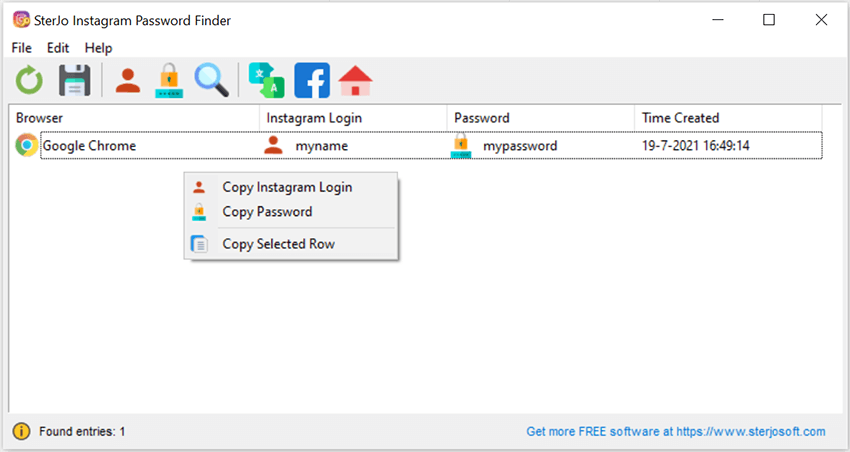
The software automatically detects installed browsers on your system and retrieves stored login data associated with instagram.com. The interface is extremely simple — just launch the tool to instantly view your saved Instagram login credentials.
Step-by-Step: Recover Your Saved Instagram Password
- Download SterJo Instagram Password Finder using the button above.
- Run the application — the portable version needs no installation.
- The tool automatically detects all supported browsers installed on your system.
- Saved Instagram credentials are displayed instantly with the associated username and password.
- Copy the password to your clipboard with one click.
Everything runs locally on your PC — no internet connection is required and no data leaves your computer.
Download & Install
📥 Download SterJo Instagram Password Finder v2.0 (2.3 MB)
Download Installer Portable Version✓ Works on Windows 11, 10, 8, 7, Vista, XP (32/64-bit)
NOTE: This software is NOT an Instagram password hacker or password cracker. It only displays Instagram login details already stored in your own web browser. Use it solely for accounts you personally own.
Version History
Version 2.0: UI changes and removed .OCX and some .DLL dependencies.
Version 1.6: Added support for the latest Microsoft Edge browser based on Chromium.
Version 1.5: Added support for the latest encryption on Chrome, Opera, Vivaldi and Brave browser.
Version 1.4: Brave Browser, Epic Privacy Browser and Torch included.
Version 1.3: Small bug fixed.
Version 1.2: Vivaldi and Yandex browsers included.
Version 1.1: Added multi-language support.
Version 1.0: First public release.
Supported Browsers
- Google Chrome
- Mozilla Firefox (32-bit only; see note below)
- Microsoft Edge (Chromium-based)
- Microsoft Edge (Legacy)
- Internet Explorer
- Opera
- Vivaldi
- Brave Browser
- Epic Privacy Browser
- Torch Browser
See: How to recover 64-bit Firefox passwords
What to Do After Recovering Your Instagram Password
A recovered password is the right moment to improve your account security:
- Change the password if it is weak or old — especially if it is a short, simple string. Use SterJo Strong Password Generator to create a strong 16+ character replacement.
- Enable two-factor authentication — In Instagram Settings → Security → Two-Factor Authentication, add your phone number or an authenticator app.
- Review login activity — Check Settings → Security → Login Activity to see all active sessions and remove any you don't recognize.
- Save your password in a password manager — so you always have access to it without relying on browser autofill alone.
Instagram vs Facebook Password Recovery
Instagram is owned by Meta (the same company as Facebook), but Instagram and Facebook accounts are separate. Your browser saves Instagram login credentials under instagram.com and Facebook credentials under facebook.com as distinct entries. SterJo Instagram Password Finder looks specifically for instagram.com entries. If you also need to recover your Facebook password, use SterJo Facebook Password Finder instead.
Frequently Asked Questions
Can this tool hack or crack Instagram passwords?
No. It only displays login credentials already saved in your own browser.
Does it support Chrome, Edge, or Brave?
Yes. All Chromium-based browsers are supported.
Can it recover Instagram passwords if I deleted my browser profile?
No. If the profile is deleted, the saved password is lost.
Can it recover Instagram passwords of another Windows user?
No. It can only access the currently logged-in user’s browser profile.
What if no results are shown?
If the tool finds nothing, your browser likely never saved your Instagram credentials, or the saved data was cleared. Try checking other installed browsers — the password may be stored in a different one.
Why is my Firefox password not showing?
Firefox 64-bit uses a different encryption library than the 32-bit version. Because SterJo's Firefox decryption module is 32-bit, passwords saved in Firefox 64-bit may appear blank. The linked guide above explains workarounds.
Does it work for business and creator Instagram accounts?
Yes. The tool recovers any instagram.com credential saved by your browser, regardless of whether the account is personal, business or creator.
What if I have multiple Instagram accounts?
The tool will display all saved instagram.com credentials it finds in the browser profiles. If multiple accounts were saved, all of them should appear in the results.
Does the tool transmit my passwords anywhere?
No. SterJo Instagram Password Finder runs entirely offline. Your recovered credentials are displayed on your screen only and are never sent to any server.
Is it legal to use this tool?
Yes — for recovering your own saved passwords from your own device. Using it to access accounts that belong to others is illegal and a violation of Instagram's terms of service.
Does it work on Windows 11?
Yes. The tool supports Windows XP through Windows 11 on both 32-bit and 64-bit systems.
Safe & Legal Use
This tool is intended only for recovering your own saved credentials from your own device. Do not use it to access accounts you do not own. Terms of Use | Privacy Policy
📋 Popular Password Guides
- Wi-Fi How to Find Any Saved Wi-Fi Password
- Product Keys Backup Keys Before Reinstalling Windows
- Security Detect Unauthorized Network Access
- Chrome Recover Saved Chrome Passwords
- Windows Windows Credential Manager Explained
